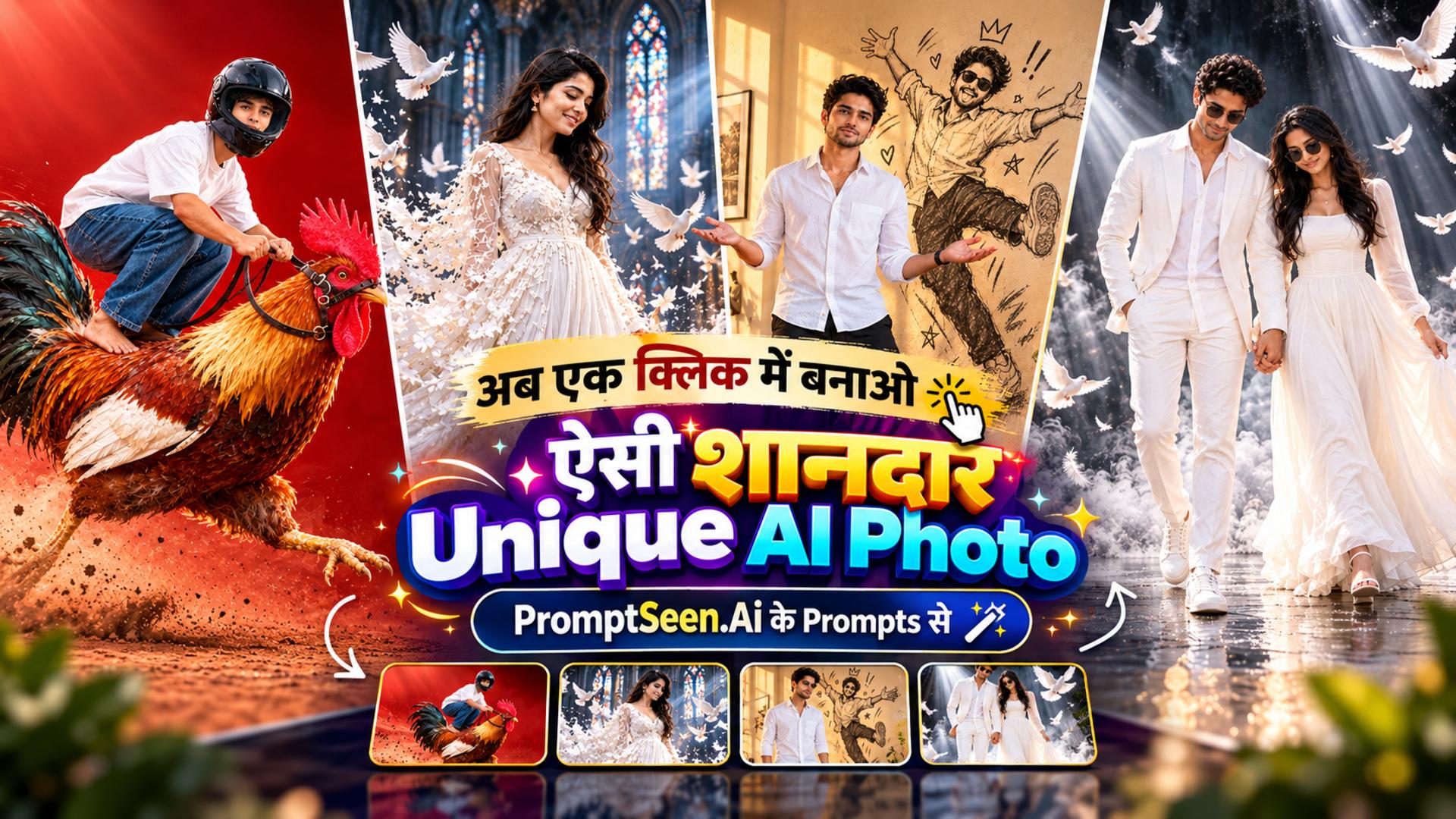
Unique AI Photo Editing Prompts for Boys, Girls & Couples
G
By Gulshan Aggarwal·
Use the uploaded reference photo as the identity reference. It may show a man, a woman or a couple. Use exactly the person or people in that photo. Keep each face, facial features, hairstyle, skin tone and body type exactly the same, with 100% identity preservation. Do not change anyone's gender and do not add or remove any person. If the photo shows two people, both must appear together in the scene.
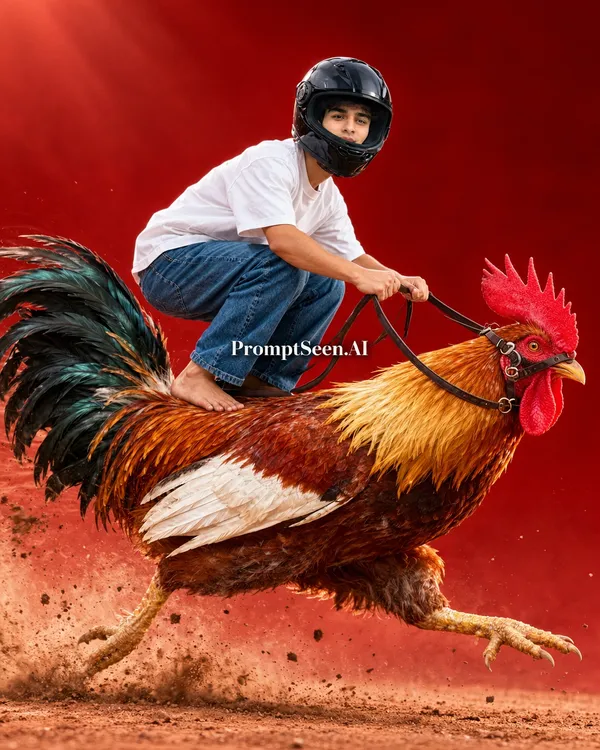
A hyper-realistic, surreal action poster. The subject is crouching low in a deep squat, barefoot, balancing on the back of a giant rooster that is sprinting at full speed from left to right. The subject wears a glossy black full-face motorcycle helmet with a dark tinted visor, an oversized plain white t-shirt and loose blue denim jeans, and leans forward like a racer with both hands gripping thin dark leather reins attached to a small bridle on the rooster's head. Long hair, if the person has it, flows out from under the helmet in the wind.
If it is a couple: both crouch on the rooster's back, one behind the other, each wearing the same helmet, white t-shirt and jeans. The person in front holds the reins and the person behind holds the front person's shoulders.
The rooster is huge, large enough to carry the rider, with golden-orange neck feathers, a rust-brown body, white wing feathers, long iridescent black-green tail feathers, a bright red comb and wattle, a sharp yellow beak and an intense eye. Its legs are stretched mid-stride with claws out, kicking up clumps of dirt, dust and small stones behind it.
Background: a rich deep red studio backdrop with a soft gradient and a subtle spotlight from the top left, red dusty ground, faint white speed streaks in the air. Side profile view, full body, slightly low camera angle.
Style: ultra-detailed commercial advertising photography, sharp focus on the subject, motion blur only on the dust and debris, dramatic rim light, high contrast, vivid colors, photorealistic textures on feathers, fabric and helmet reflections, 8K. No text, no watermark, no logo.
Aspect Ratio: 4:5
2. Cathedral Dove Dispersion
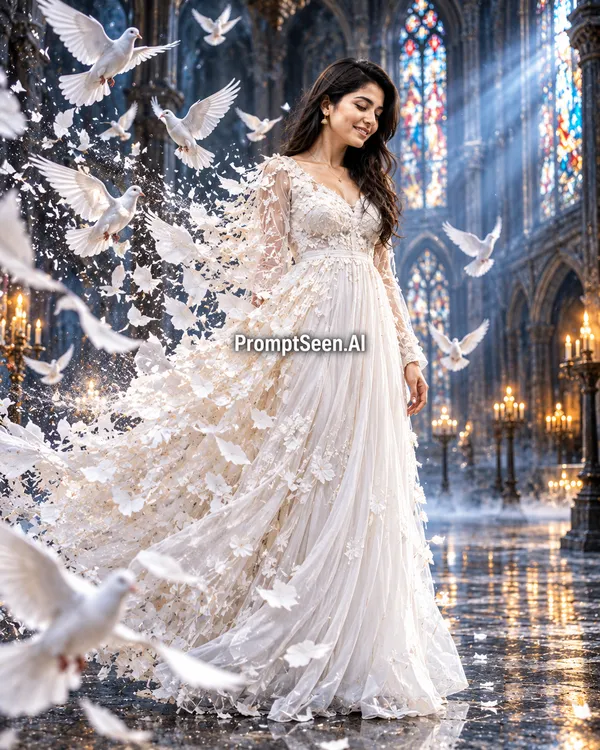
Add magic and emotion to your photos. The dove dispersion photo editing prompt breaks your all-white outfit into floating shards that transform into flying doves inside a grand gothic cathedral.
Use the uploaded reference photo as the identity reference. It may show a man, a woman or a couple. Use exactly the person or people in that photo. Keep each face, facial features, hairstyle, skin tone and body type exactly the same, with 100% identity preservation. Do not change anyone's gender and do not add or remove any person. If the photo shows two people, both must appear together in the scene. Keep glasses only if they are worn in the reference photo.
A cinematic fantasy portrait inside a grand gothic cathedral. The subject stands in a three-quarter side view, head bowed, eyes looking down with a calm, melancholic expression. The outfit is all white and suits the person. For a man: a long white linen overcoat, a white shirt with an open collar, white trousers and white sneakers, with both hands in the trouser pockets. For a woman: a long flowing white gown, or a long white coat over a white dress, with arms relaxed at her sides.
If it is a couple: they stand close together, side by side and holding hands, both with heads bowed and both in all-white outfits.
The back of the body and outfit is breaking apart in a dispersion effect. The fabric shatters into white fragments, torn paper-like shards, dust particles and feathers that transform into white doves flying away to the left. For a couple, both figures break apart at their outer edges. Many white doves with wings spread fill the frame, some very close to the camera and softly blurred in the foreground.
Environment: tall gothic stained-glass windows, stone pillars and arches, strong volumetric rays of light streaming through the windows, glowing candles on iron stands in the background, soft mist rolling over a dark glossy reflective floor.
Lighting and style: cool blue-white cinematic tones with warm candle highlights, dramatic backlight, floating dust particles, shallow depth of field, low camera angle, full-body shot, ultra-realistic, highly detailed, epic and ethereal mood, 8K. No text, no watermark.
Aspect Ratio: 4:5
3. Sketch Wali Parchhai – Doodle Shadow
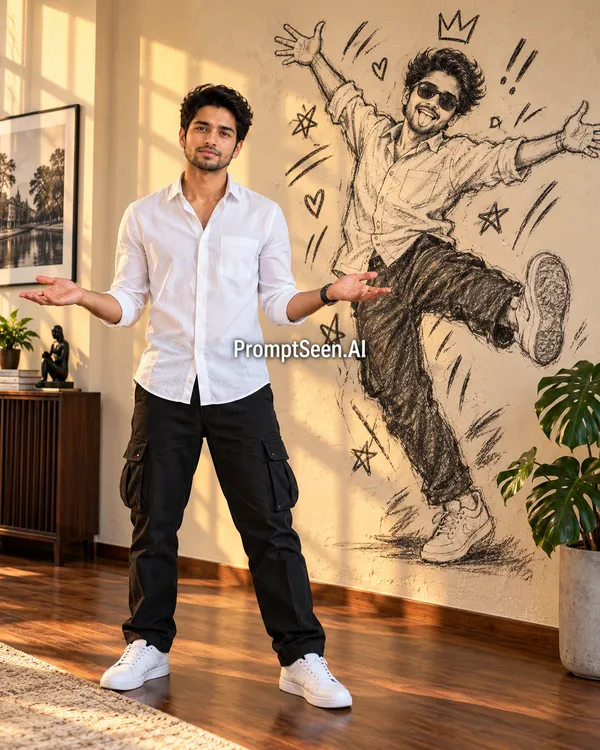
Show your hidden fun side! The sketch shadow photo prompt captures you standing seriously in a sunlit room, while your shadow on the wall turns into a wild, dancing charcoal doodle.
Use the uploaded reference photo as the identity reference. It may show a man, a woman or a couple. Use exactly the person or people in that photo. Keep each face, facial features, hairstyle, skin tone and body type exactly the same, with 100% identity preservation. Do not change anyone's gender and do not add or remove any person. If the photo shows two people, both must appear together in the scene. Keep glasses only if they are worn in the reference photo.
A realistic full-body photo of the subject standing in a warm, sunlit living room during golden hour. The subject wears a white linen shirt with rolled-up sleeves, black cargo pants and clean white sneakers. The subject stands with legs apart, both arms open and palms facing up in a confused "what?" shrug, with a serious, deadpan expression, looking at the camera.
On the cream textured wall behind, exactly where the shadow should fall, there is a large hand-drawn black charcoal sketch of the same person instead of a shadow. It is a playful, wild version of them: jumping with one leg kicked up, both arms thrown wide, messy hair, sunglasses, tongue sticking out, laughing. The sketch clearly looks like the same person, with the same hairstyle and the same shirt, cargo pants and sneakers. Around the sketch are doodles: a crown above the head, hearts, stars, exclamation marks and energetic motion lines. It looks like rough charcoal drawn directly on the wall with visible scribble strokes.
If it is a couple: both stand side by side in the same shrug pose with serious faces, and each has their own charcoal sketch on the wall behind them. The two sketches are jumping and dancing together.
Room details: warm sunlight coming through a window on the left, casting soft window-frame shadows across the wall, a dark wooden floor, a framed black-and-white photograph on the left wall, a dark wooden cabinet with a small black sculpture, and a green monstera plant in a concrete pot on the right.
Style: photorealistic, natural warm tones, soft cinematic lighting, sharp details, 50mm lens look, eye-level camera, 8K. The contrast between the serious real person and the crazy, happy sketch shadow is the main idea. No text, no watermark.
Aspect Ratio: 4:5
4. Water Splash Body Illusion
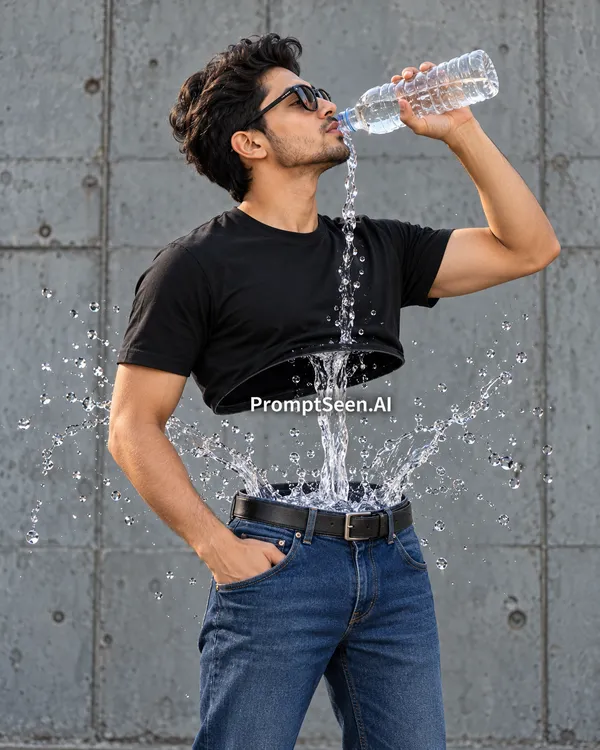
Create an impossible optical illusion. The water splash photo editing prompt removes your midsection entirely, showing crystal-clear water pouring straight from a bottle down into your jeans.
Use the uploaded reference photo as the identity reference. It may show a man, a woman or a couple. Use exactly the person or people in that photo. Keep each face, facial features, hairstyle, skin tone and body type exactly the same, with 100% identity preservation. Do not change anyone's gender and do not add or remove any person. If the photo shows two people, both must appear together in the scene. Keep glasses only if they are worn in the reference photo.
A surreal, hyper-realistic photo manipulation. The subject stands in a side profile view facing right, head tilted back slightly, drinking from a clear plastic water bottle held in the right hand with the elbow raised. The subject wears a fitted black t-shirt and dark blue denim jeans with a black leather belt.
The surreal twist: the entire midsection is missing. The black t-shirt ends at the lower ribs like a floating hollow shell, and the jeans with the belt stand on their own below. In the empty gap between the t-shirt and the belt there is no body, only the water being drunk, pouring straight down from inside the shirt into the waistband of the jeans as a twisting stream of crystal-clear water. The water bursts outward in a dramatic splash on both sides, with frozen droplets, ribbons of water and tiny bubbles suspended in the air.
If it is a couple: they stand facing each other in side profile, each drinking from their own bottle, and both have the same missing midsection with water pouring through and splashing between them.
Background: a plain grey raw concrete wall with visible panel lines and subtle texture, soft diffused daylight, muted cool tones.
Style: high-speed photography, ultra-sharp frozen water details, realistic refraction and highlights in the water, photorealistic skin and fabric textures, medium shot from head to thighs, clean minimal composition, 8K. No text, no watermark, no logo.
Aspect Ratio: 4:5
5. White Suit Dove Walk
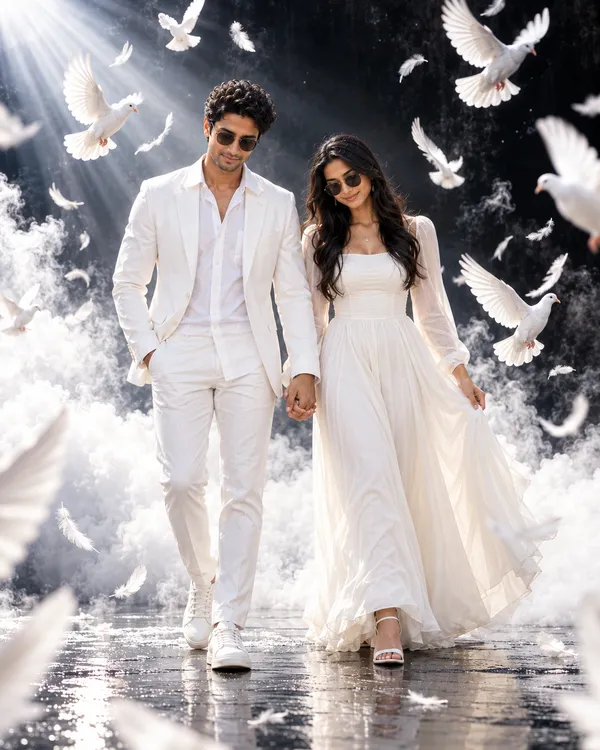
Elegance meets fantasy. The white suit AI photo prompt gives you a powerful, heavenly vibe as you walk toward the camera dressed in all white, surrounded by flying doves and rolling smoke.
Use the uploaded reference photo as the identity reference. It may show a man, a woman or a couple. Use exactly the person or people in that photo. Keep each face, facial features, hairstyle, skin tone and body type exactly the same, with 100% identity preservation. Do not change anyone's gender and do not add or remove any person. If the photo shows two people, both must appear together in the scene. Keep glasses only if they are worn in the reference photo.
A cinematic, dreamy full-body portrait of the subject walking slowly toward the camera, head slightly bowed, eyes looking down with a calm, confident expression. The outfit is all white and suits the person. For a man: a white tailored blazer, a white shirt with an open collar, white trousers and white sneakers, with one hand in the trouser pocket. For a woman: a white tailored pantsuit or an elegant flowing white dress, with white sneakers or heels.
If it is a couple: they walk side by side toward the camera holding hands, both in all-white outfits.
All around, white doves are flying in every direction with wings spread wide, some sharp and some softly blurred in the foreground near the camera. White feathers float in the air. Thick white clouds and smoke roll around the legs and across the ground, as if walking through the sky.
Background: a dark black textured studio wall for strong contrast, a glossy wet black floor with soft reflections, and a dramatic beam of light coming from the top left corner with visible haze.
Style: high-contrast black-and-white color palette with natural skin tones, soft glowing rim light on the white outfit, shallow depth of field, slightly low camera angle, ultra-realistic editorial fashion photography, heavenly and powerful mood, 8K. No text, no watermark.
Aspect Ratio: 4:5
Some photos make you stop scrolling. A rider racing on a giant rooster, a white coat turning into flying doves, a shadow that becomes a dancing sketch. These unique AI photo editing prompts are made for exactly that kind of picture. You do not need Photoshop or any editing skill. Just upload one clear reference photo, paste the prompt, and the AI builds the whole scene around your face.
Many people search for Gemini AI photo editing prompts copy paste, and that is exactly what PromptSeen AI gives you here. All five prompts above are written to work for boys, girls and couples, so the same text fits any reference photo. Each one is written to keep your real face and ends in a 4:5 size that suits Instagram posts. Pick the idea you like, copy it in one tap, and try it in Gemini or ChatGPT.
1. Rooster Rider – Murge Ki Sawari
Ready for a wild ride? The rooster rider AI photo prompt creates an intense, hyper-realistic action poster where you are balancing barefoot on a giant sprinting rooster. Perfect for a funny yet epic Instagram post.
7. How to Create These Photos in Gemini and ChatGPT
Ready to try them out? Follow these simple steps:
Step 1: Save a clear, front-facing photo of yourself to your gallery.
Step 2: Open Google Gemini or ChatGPT and click the attachment icon to upload your photo.
Step 3: Browse the five options above, find the one you like, and tap the Copy button.
Step 4: Paste the text into the AI chat box and send it. In seconds, you will have a high-quality, surreal portrait.
8. How to Use One Prompt for Boys, Girls and Couples
You don't need to hunt for different prompts if you want to include your partner. These templates are specifically engineered as couple AI photo editing prompts just as much as they are for solo portraits. The first paragraph of every prompt tells the AI to count the faces in your uploaded photo. If you upload a solo picture, it creates a solo scene. If you upload a couple's photo, it automatically applies the "couple instructions" built into the text.
9. How to Write a Unique AI Photo Prompt
If you want to experiment beyond these viral AI photo prompts, writing your own is easy once you know the formula. Start by firmly telling the AI to "preserve facial identity 100%." Then, describe the surreal element clearly—like "a shadow that looks like a doodle" or "a body made of water." Finally, lock in the style by adding terms like "photorealistic, 8K, cinematic lighting."
10. Unique AI Photo Prompt Generator Ideas
Need more ideas? Try mixing everyday objects with epic scales. Imagine sitting on a giant floating pizza slice over a cyberpunk city, or having a glowing galaxy swirling inside your coffee cup. The best trending AI photo prompts usually combine something very normal with something completely impossible.
11. Tips for the Best Results
To make sure your creative AI photo editing prompts work perfectly on the first try:
Use High-Quality References: If your uploaded photo is blurry or heavily filtered, the AI will struggle to copy your face accurately.
Avoid Sunglasses: Unless the prompt specifically calls for them, photos without sunglasses yield much better facial recognition.
Regenerate: AI is random. If the first result is a bit off, simply hit "regenerate" using the exact same prompt to get a completely new version.
12. FAQ – Unique AI Photo Editing Prompts
What are unique AI photo editing prompts?
Unique AI photo editing prompts are specific text instructions you give to AI models like Gemini or ChatGPT. They use your reference photo to place your face into creative, surreal, and impossible situations without needing Photoshop skills.
How do Gemini AI photo editing prompts copy paste work?
It is simple! Upload a clear photo of your face into Google Gemini, copy any of the prompt templates from this page, and paste it into the chat. The AI will read the text and generate a new image matching the description while keeping your face unchanged.
Can these templates be used as AI photo editing prompts for boys and girls?
Yes, absolutely. Every prompt on this page is gender-neutral. The AI will automatically adapt the clothing and body type based on the gender it detects in your uploaded reference photo.
How do I use couple AI photo editing prompts?
To create a couple photo, simply upload a reference image that clearly shows both people's faces. The prompts are designed with instructions to keep both people in the scene if two faces are detected.
What is the Nano Banana prompt?
Nano Banana refers to the internal image generation architecture of Google Gemini. When users search for 'Nano Banana prompts', they are looking for specific text templates that leverage Gemini's hyper-realistic capabilities.
Why does the AI change my face sometimes?
AI can struggle if the reference photo is blurry, covered with sunglasses, or has bad lighting. Always use a clear, front-facing, well-lit photo to ensure the best face identity preservation.