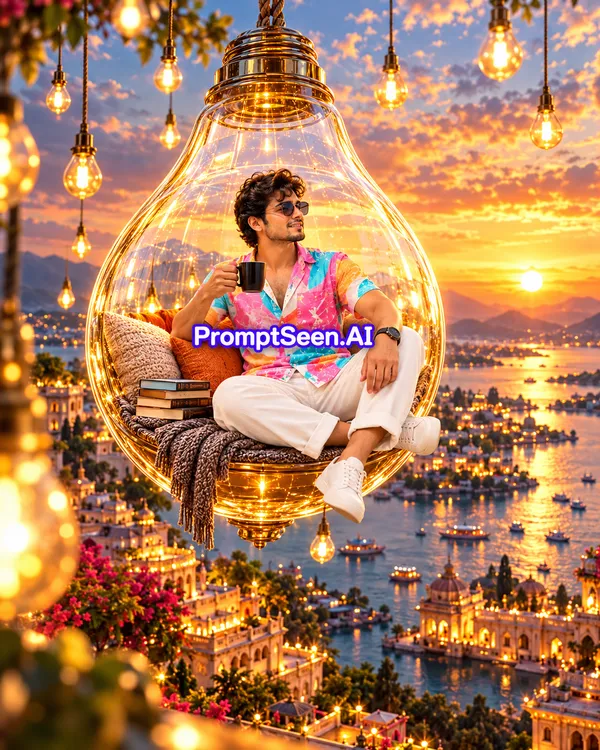
Start with magical realism. This lighting AI photo prompt places you inside a giant glowing lightbulb swing suspended above a golden-hour fantasy cityscape.
Cinematic wide shot: A young man with glasses, holding a mug, relaxed in a giant transparent lightbulb swing chair with pillows and books. Suspended above a breathtaking fantasy cityscape at golden hour. Numerous glowing lightbulbs, ethereal, magical realism, vibrant, highly detailed. Ratio 9:16
2. Shadows Lighting Prompts
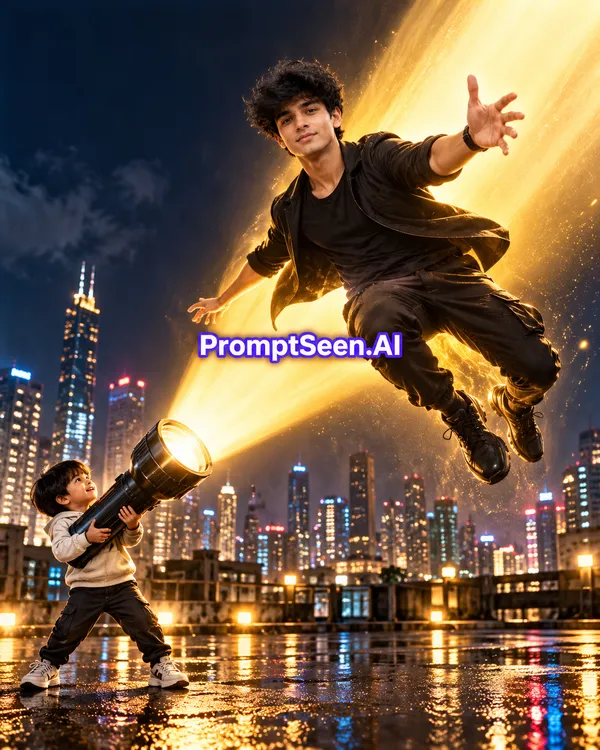
Create an action-movie visual with this shadows lighting AI prompt. An oversized flashlight beam casts a dramatic golden glow and wet street reflections at night.
Hyperrealistic cinematic night: stylish man in black, dynamic mid-air, powerful golden glow. Child aims oversized flashlight with intense beam. Dramatic city skyline, wet street reflections. Action movie still. Ratio 9:16
3. Shadows Lighting Prompts for girl
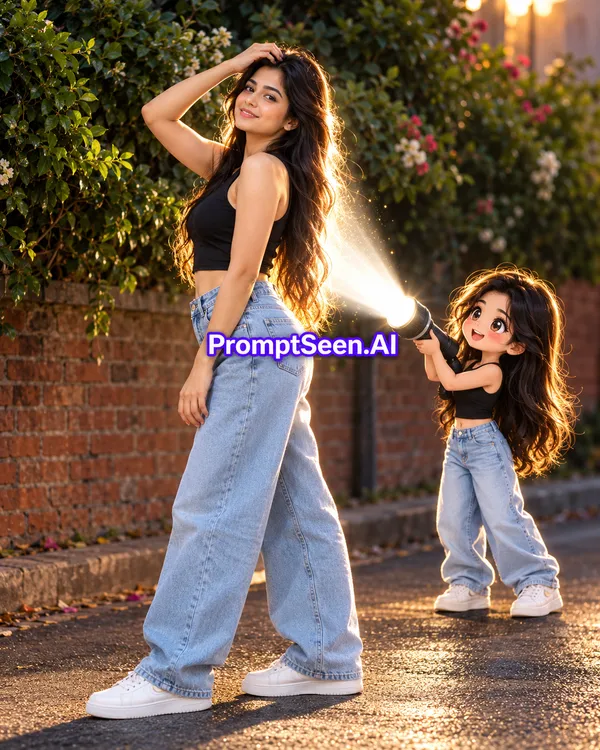
Blend real-life photography with 2D anime art. This shadow AI photo prompt features a cute chibi version of you shining a bright glowing rim light onto your back and hair.
Kk full-body photorealistic vertical shot jisme lambe kaale baalon wali ek young ladki dark green bushes aur brick wall ke samne road par side pose mein khadi hai, usne black sleeveless crop top, light-blue loose baggy jeans aur white sneakers pehne hain aur ek haath maathe par rakh kar camera ki taraf dekh rahi hai, jabki uske peeche right side mein usi ke jaisi dikhne wali ek choti cute 2D chibi anime ladki same outfit mein khadi hokar apne haath ki flashlight se badi ladki ki peeth aur baalon par bright white glowing rim light daal rahi hai, mixed-media photography aur anime illustration style, cinematic dramatic lighting, 8k resolution.
4. Body Double Prompt
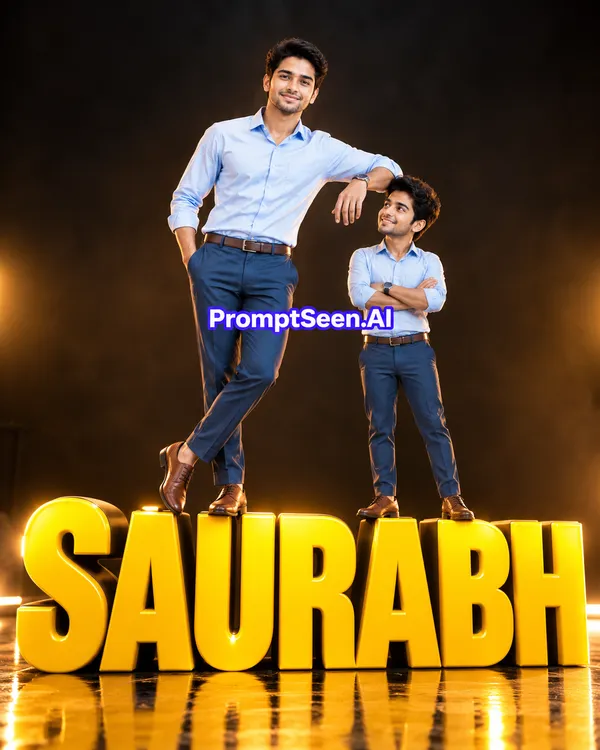
Stand alongside your own miniature clone on bold 3D typography. This AI lighting prompt uses studio softbox illumination and a reflective dark floor for a sharp commercial look.
A stylish young man, duplicated with a mini-me, stands dynamically on large 3D yellow SAURABH letters. Full body, low angle studio shot. Professional softbox lighting with warm cinematic glow, subtle rim light, dark backdrop, reflective floor.
5. Soule Scape for Boy Girl
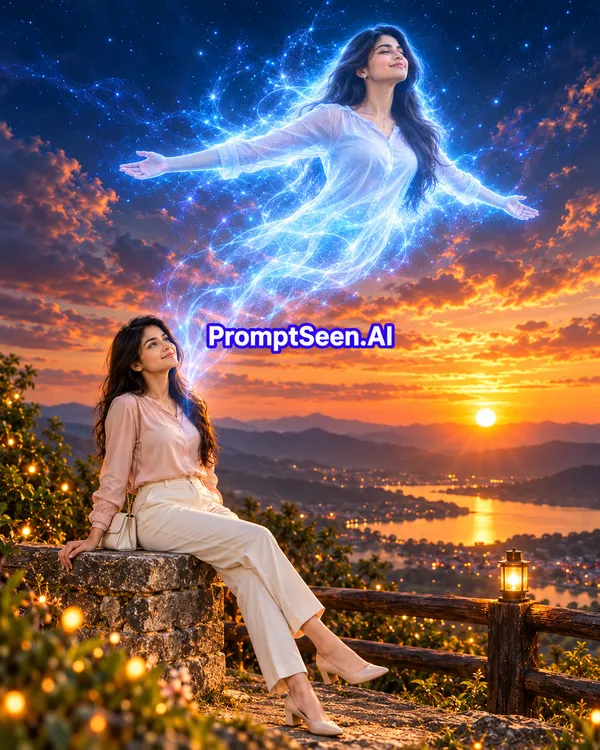
Experience a breathtaking astral-projection edit. This shadows and lighting prompt contrasts warm golden sunset tones with an electric-blue spirit rising from your chest.
Use the uploaded photo as the strict reference for the person. Preserve their exact face, facial structure, skin tone, age, hairstyle, glasses/accessories (if any) and natural body proportions. Do not beautify or change the face.
Create an ultra-realistic cinematic "Soulescape" vertical image (9:16).
Main subject (bottom half): the person sits relaxed sideways on a textured stone pillar of a hilltop viewpoint railing, one hand resting on the stone, legs stretched forward, body leaning back slightly, head tilted up, gazing peacefully at the sky with a calm, content expression. Keep their outfit from the uploaded photo; if it's not clearly visible, dress them in a dark open overshirt over a white t-shirt, beige cargo pants and white-grey sneakers. A wooden railing runs behind them, with small green bushes and soft bokeh fairy lights in the foreground.
Soul / astral form (upper half): a glowing translucent spirit version of the SAME person rises out of their chest and floats diagonally up into the sky, with the identical face, hair and outfit shape, arms spread wide open, palms facing outward, head tilted back in a feeling of total freedom. The spirit body is made of luminous electric-blue and white energy, flowing wispy smoke-like strands, fine lightning veins and tiny sparkling particles. Its lower body dissolves into a long trail of blue energy streams that connects back to the seated person's chest.
Background: a breathtaking sunset from a hilltop, layered mountains fading into haze, a winding river/lake reflecting the golden sun, a distant town with warm glowing lights. The sky is dramatic: deep navy and indigo at the top with scattered stars, heavy clouds lit in fiery orange and pink near the horizon, the sun glowing low behind the mountains.
Lighting: strong contrast between the warm golden sunset light on the seated person and the cool blue glow of the spirit; the spirit casts a soft blue rim light on the person's face and hair. Magical, spiritual, uplifting mood.
Style: hyper-realistic photography mixed with fantasy VFX, shot on a full-frame camera with a 24–35mm lens, rich cinematic color grading (teal-blue and orange), high detail, natural skin texture, slight film grain.
Avoid: text, labels, watermarks, logos, extra people, distorted hands or fingers, a different face on the spirit, cartoon or painting style, plastic skin.
6. Clone Escape Prompt For Boy Girl
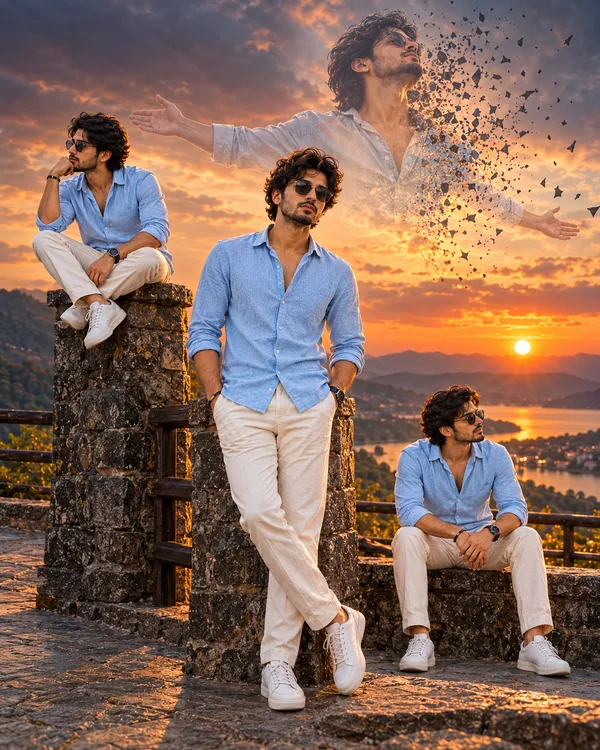
Tell a deeper visual story with multiple versions of yourself in one frame. This realistic shadows AI prompt places four clones across a sunset viewpoint while a spirit form disperses into glowing shards overhead.
Use the uploaded photo as the strict reference for the person. Preserve their exact face, facial structure, skin tone, age, hairstyle, glasses/accessories (if any) and natural body proportions in EVERY version. All clones must look like the exact same person. Do not beautify or change the face.
Create an ultra-realistic cinematic "Clone Escape" vertical image (9:16) showing the same person in four different versions in one scene.
Outfit (same on all four versions): keep the outfit from the uploaded photo; if it's not clearly visible, use a dark brown open overshirt with rolled sleeves over a plain white t-shirt, beige cargo pants, white-grey sneakers and a black smartwatch.
Setting: a hilltop viewpoint at sunset with textured dark stone pillars, a low stone ledge/step, a wooden railing behind, and a paved stone floor in the foreground.
Version 1 (center, main subject, in sharp focus): standing and leaning back against a stone pillar, legs crossed at the ankles, one hand in the pants pocket, the other arm relaxed, looking straight into the camera with a confident, calm expression. Full body visible, tallest and closest to the camera.
Version 2 (left, behind the main subject): sitting on top of the stone pillar, elbow on knee, fist resting under the chin in a thoughtful pose, looking sideways into the distance.
Version 3 (right, slightly behind): sitting on the low stone ledge, legs apart, forearms resting on the knees, hands loosely clasped, looking away to the side with a quiet, reflective expression.
Version 4 (top, in the sky): a large semi-transparent ghostly version of the same person floating above the scene, head tilted back, eyes closed, arms spread wide open in a feeling of release and freedom. The right side of this body is disintegrating into hundreds of small dark shards, fragments and dust particles that scatter and drift away into the sky, like the soul breaking free.
Background: a dramatic sunset over layered mountains, a calm lake or river reflecting the light, the sun glowing low on the right horizon, warm orange and golden tones near the horizon fading into moody dark grey-blue clouds above.
Lighting: warm golden sunset backlight with soft rim light on the hair and shoulders of all ground versions, natural soft fill on the faces, realistic shadows on the stone and floor. Consistent light direction across all clones so they look naturally part of one scene.
Style: hyper-realistic photography with a subtle fantasy dispersion effect, shot on a full-frame camera with a 35mm lens, shallow depth of field, cinematic teal-and-orange color grading, high detail, natural skin texture, slight film grain.
Avoid: text, labels, signs with writing, watermarks, logos, extra people, different faces between clones, distorted hands or fingers, duplicated limbs, cartoon or painting style, plastic skin.
7. Reality Fold Prompt For Boy Girl
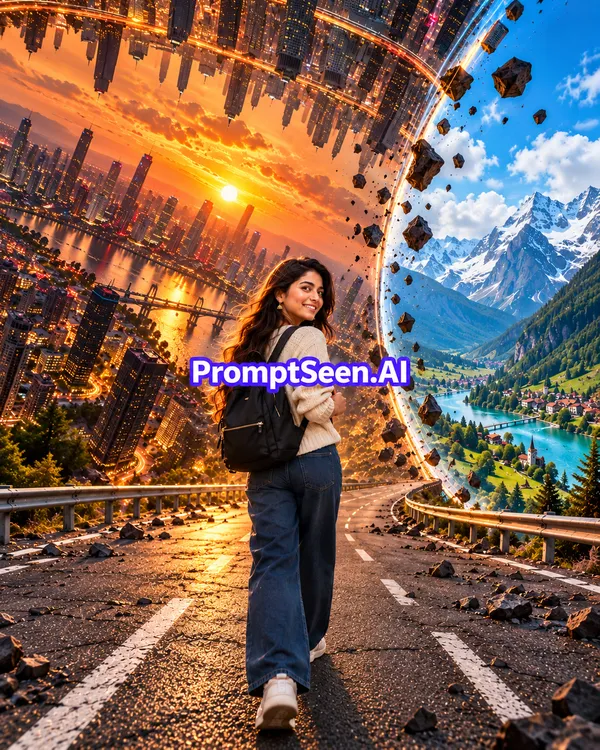
Bend dimensions like a sci-fi blockbuster. This realistic lighting AI prompt splits the world between a folding golden-hour skyline and a bright alpine valley, balancing warm and cool light across your portrait.
Use the uploaded photo as the strict reference for the person. Preserve their exact face, facial structure, skin tone, age, hairstyle and natural body proportions. Do not beautify or change the face.
Create an ultra-realistic cinematic "Reality Fold" vertical image (9:16).
Main subject: the person stands in the middle of a wide asphalt highway with white lane markings and metal guardrails, seen from behind at a slight angle, walking away from the camera. They turn their head and shoulders back over one shoulder, looking straight into the camera with a soft, warm smile. Keep their outfit from the uploaded photo; if it's not clearly visible, dress them in a cream chunky knit sweater, loose dark-wash wide-leg jeans, white sneakers and a black backpack on both shoulders. Hair moves slightly in the wind.
The reality fold (left side and overhead): the world bends like the city-folding scene from a sci-fi film. A huge modern city with glowing skyscrapers, bridges and a reflective river curves upward from the left edge of the road and folds over the top of the frame, so buildings hang upside down from the sky. This side is lit by a golden sunset, with the sun glowing low between the towers, warm orange and peach clouds, and city lights starting to glow.
The seam (right side): a tall, smooth, curved mirror-like glass edge runs from the top of the frame down to the road, like the world has been peeled open. Through it, a completely different reality is visible: a bright daytime alpine valley with snow-capped mountains, green forested slopes, a turquoise river, a small village, a deep blue sky and fluffy white clouds.
Details: broken rocks and chunks of debris float in mid-air along the fold and the seam, small stones are scattered on the cracked road, tiny particles drift in the air. The road stretches ahead and curves into the distance.
Lighting: warm golden sunset light falling on the person from the left, a cool natural daylight glow spilling from the right reality, soft rim light on the hair and shoulders, realistic shadows on the road.
Style: hyper-realistic photography mixed with surreal VFX, shot on a full-frame camera with a wide 20–24mm lens at a low angle to exaggerate the bending world, deep depth of field, rich cinematic color grading (golden orange on one side, vivid blue and green on the other), high detail, natural skin texture, slight film grain.
Avoid: text, watermarks, logos, extra people, distorted face or hands, warped body proportions, cartoon or painting style, plastic skin.
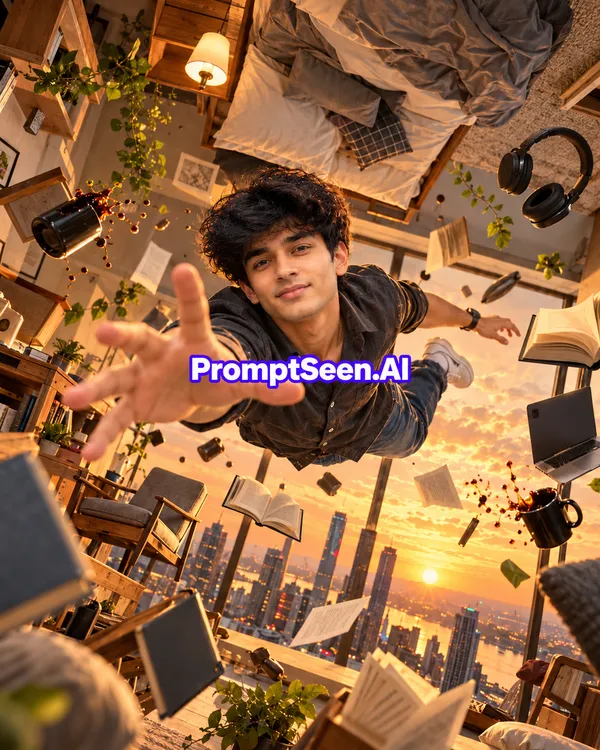
8. Gravity Room Prompt For Boy Girl
Float weightlessly inside a zero-gravity bedroom. This Shadows Lightings prompta uses golden sunset window backlight and warm lamp fill to cast lifelike rim highlights across floating books and coffee droplets.
Use the uploaded photo as the strict reference for the person. Preserve their exact face, facial structure, skin tone, age, hairstyle, facial hair and natural body proportions. Do not beautify or change the face.
Create an ultra-realistic cinematic "Gravity Room" vertical image (9:16) where gravity has completely disappeared inside a cozy high-rise apartment bedroom.
Main subject: the person floats weightlessly in mid-air in the center of the room, body stretched horizontally like flying, legs bent and drifting behind them. They reach one hand straight toward the camera with fingers spread (strong foreshortening, hand very close to the lens), the other arm relaxed out to the side, looking directly into the camera with a big, joyful, natural smile. Keep their outfit from the uploaded photo; if it's not clearly visible, dress them in a dark charcoal button-up shirt with sleeves pushed up, dark jeans, white-grey sneakers and a black wristwatch. Hair lifts slightly as if floating.
The room: the whole room is tilted and rotated, so the bed with rumpled grey blankets and pillows hangs upside down from the ceiling at the top of the frame, with a glowing bedside lamp beside it. Wooden furniture, an armchair, a side table, shelves with potted plants and a desk are all floating at odd angles around the person.
Floating objects: open books with pages fluttering, closed notebooks, cushions, a black coffee mug spilling coffee droplets that hang frozen in the air, headphones, a laptop, small potted plants with loose leaves, papers and little decor items, all drifting in zero gravity at different distances, some close and slightly blurred in the foreground.
Background: a huge floor-to-ceiling glass window behind the person, showing a city skyline of tall skyscrapers at golden hour, the sun glowing low on the horizon, soft golden clouds filling the sky, city lights starting to glow.
Lighting: warm golden sunset light pouring in through the window as backlight, creating a glowing rim light on the person's hair, shoulders and the floating objects; soft warm fill from the bedside lamp on the face; realistic shadows and light flares.
Style: hyper-realistic photography with a playful surreal zero-gravity effect, shot on a full-frame camera with a wide 16–20mm lens from a slightly low dynamic angle, frozen-motion moment, rich warm cinematic color grading (golden, amber and soft brown tones), high detail, natural skin texture, slight film grain.
Avoid: text, watermarks, logos, extra people, distorted face, extra or deformed fingers on the reaching hand, warped body proportions, cartoon or painting style, plastic skin.
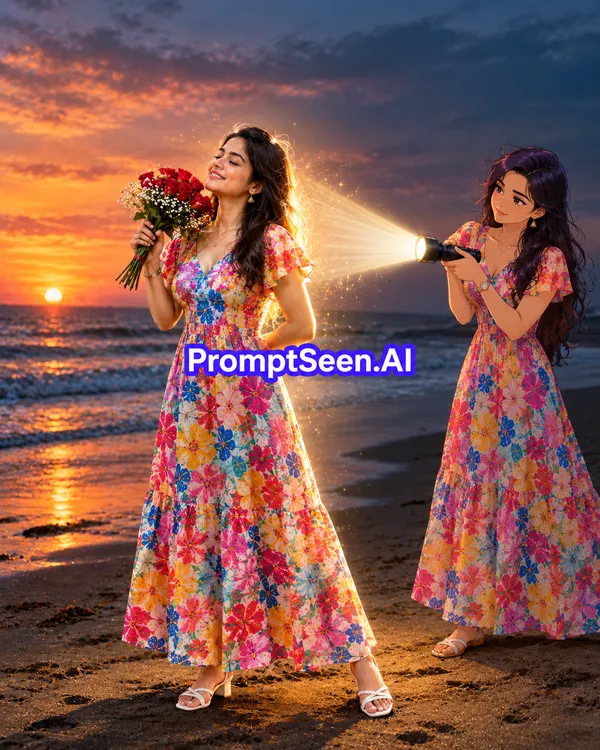
9. Shadows Lighting With Flowers Prompt For Boy Girl
Combine dreamy twilight beach vibes with mixed-media anime lighting. This AI shadow prompt shows an illustrated version of you shining a volumetric flashlight beam onto your real self holding red roses.
Use the uploaded photo as the strict reference for the person. Preserve their exact face, facial structure, skin tone, age, hairstyle, facial hair and natural body proportions. Do not beautify or change the face.
Create a cinematic "Shadows Lighting" vertical image (9:16) that mixes a real photo with an anime-style version of the same person.
Main subject (left-center, ultra-realistic photo): the person stands on a dark sandy beach at dusk, full body visible, chin lifted up, eyes gently closed, with a peaceful, dreamy expression, holding a bouquet of fresh red roses with small white baby's breath flowers near their face in one hand, the other hand tucked behind the back at the waist. Outfit: keep the outfit from the uploaded photo; if it's not clearly visible, dress them in a loose white linen shirt with long sleeves, white linen trousers, chunky off-white sneakers and a black wristwatch.
Second figure (right, slightly behind, anime illustration style): a 2D anime / semi-realistic illustrated version of the SAME person, clearly recognizable with the same face shape, hairstyle and outfit, but drawn in a clean modern anime art style with smooth cel shading and slightly purple-tinted dark hair. This illustrated version stands calmly, holding a black flashlight with both hands, pointing it at the real person's back and shoulders, with a serious, caring expression, as if lighting them up from within.
The light: a strong, bright white flashlight beam travels from the torch to the real person, creating a glowing halo of light around their back, shoulders and hair, with visible volumetric light rays and tiny sparkling dust particles floating inside the beam. The real person's white clothes glow softly where the light hits.
Background: an empty beach at twilight, gentle waves rolling in on the left, wet reflective sand near the water, a faint orange and pink sunset glow on the horizon fading into a deep blue-grey sky with a few soft clouds. Mostly dark surroundings so the flashlight beam stands out.
Lighting: low ambient dusk light, the flashlight as the key light from behind-right creating a bright rim glow on the real person, soft warm sunset fill on the face, long subtle shadows on the sand.
Style: the real person and the scene are hyper-realistic photography (full-frame camera, 35mm lens, natural skin texture, slight film grain, cinematic moody color grading in deep blue and warm orange); only the second figure is drawn in anime illustration style, blended naturally into the scene with matching light direction.
Avoid: text, watermarks, logos, extra people, a different face on the anime version, the real person turning cartoon-like, distorted hands or fingers, plastic skin.
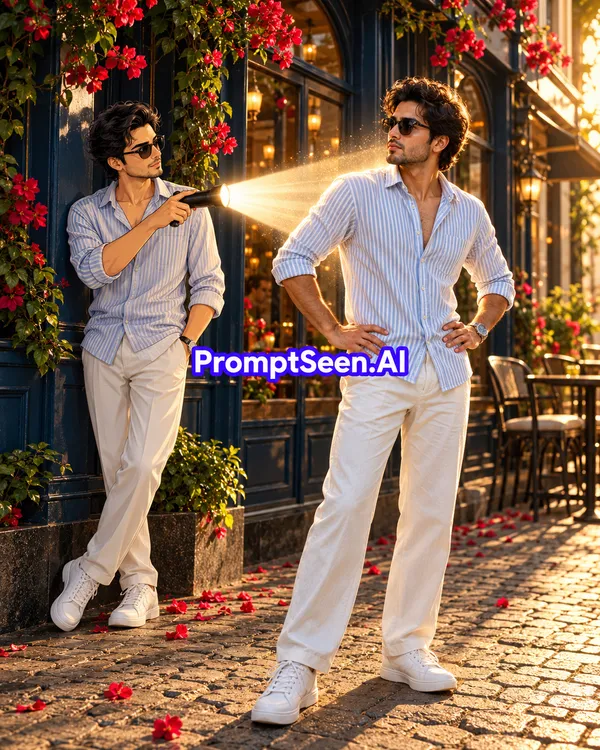
10. Back Shadows Lighting Prompt For Boy Girl
Turn heads with a dual-lit street portrait. This viral AI photo prompt pairs golden-hour sunlight from the right with a warm flashlight beam held by your 2D anime counterpart on the left.
Use the uploaded photo as the strict reference for the person. Preserve their exact face, facial structure, skin tone, age, hairstyle, facial hair and natural body proportions. Do not beautify or change the face.
Create a cinematic "Shadows Lighting" vertical image (9:16) that mixes a real photo with an anime-style version of the same person.
Main subject (right-center, ultra-realistic photo): the person stands confidently on a cobblestone sidewalk, full body visible, both hands resting on the hips, body facing slightly away, head turned back over the shoulder toward the left, looking at the anime version with a cool, curious expression, wearing dark sunglasses. Outfit: keep the outfit from the uploaded photo; if it's not clearly visible, dress them in a light blue-and-white vertical striped button-up shirt with the top buttons open and sleeves rolled up, loose wide-leg white trousers, chunky white sneakers and a silver wristwatch.
Second figure (left, slightly behind, anime illustration style): a 2D anime / semi-realistic illustrated version of the SAME person, clearly recognizable with the same face shape, hairstyle, sunglasses and identical outfit, drawn in a clean modern anime art style with smooth cel shading. This illustrated version stands relaxed, one hand in the pocket, the other hand holding a black flashlight at chest level, pointing it straight at the real person's shoulder and face, with a calm, serious expression.
The light: a bright warm-white flashlight beam travels from the torch to the real person, with visible volumetric light rays and tiny glowing dust particles floating inside the beam, creating a soft glowing halo on the real person's shoulder, hair and side of the face.
Background: the front of a stylish café with a deep navy-blue facade, arched glass windows with warm interior lights glowing inside, blank shop signboards with no readable text, and lush green climbing plants covered in bright red bougainvillea flowers. A dark granite base wall runs along the bottom, with a few fallen red petals scattered on the cobblestone pavement.
Lighting: golden-hour sunlight coming from the right, casting warm light and long shadows on the pavement; the flashlight as a second key light from the left creating a bright rim glow; rich contrast between the warm sunlight and the cool navy facade.
Style: the real person and the scene are hyper-realistic photography (full-frame camera, 35mm lens, natural skin texture, slight film grain, cinematic color grading in navy blue, warm gold and bold red); only the second figure is drawn in anime illustration style, blended naturally into the scene with matching light direction and shadows.
Avoid: readable text or letters on signs, watermarks, logos, extra people, a different face on the anime version, the real person turning cartoon-like, distorted hands or fingers, plastic skin.
Have you noticed how the most viral Instagram Reels and AI portraits right now all share one secret ingredient? It is not just a cool outfit or a fantasy background—it is dramatic shadows lighting. When an image has a believable key light, a glowing rim halo around the hair, and deep cast shadows across the floor, the human eye immediately reads it as a real camera photograph rather than flat computer art. That is why creators are searching for the best Shadows Lightings prompta collection to transform their everyday selfies into scroll-stopping 4K visuals.
Whether you want an anime version of yourself holding a glowing flashlight beam behind your back, a zero-gravity bedroom bathed in golden sunset rays, or an astral Soulescape spirit rising into the twilight sky, our curated viral AI photo prompts give you complete control over exposure, contrast, and shadow direction. Engineered for Google Gemini and ChatGPT, each shadows lighting AI prompt on this page locks onto your real facial identity and natural skin texture while building cinematic light physics around you.
12. How to Create Realistic Shadows and Lighting in AI Photos
Generating a high-contrast portrait with a lighting AI photo prompt takes less than a minute when you follow this simple workflow in Google Gemini or ChatGPT:
Pick a Clear Reference Photo: Choose a sharp, well-lit selfie or full-body photo where your face is clearly visible without heavy filters or motion blur.
One-Click Copy & Open: Browse the 10 AI photo editing prompts above and tap the ChatGPT or Gemini button on any card. Our page will automatically copy the prompt text to your clipboard and open the AI app.
Upload & Paste: Attach your reference photo in the chat box, paste the copied shadow AI photo prompt, and press generate.
Customize Your Name or Outfit: In templates like #4 ("Body Double Prompt"), simply replace the 3D letters SAURABH with your own name, or tweak the outfit colors while keeping the lighting instructions untouched.
13. Tips for Better Shadows and Lighting in AI Prompts
If you want your realistic AI photo to look like it was shot on a full-frame camera with a 35mm lens rather than a plastic CGI render, keep these lighting principles in mind:
Define Light Direction & Rim Glow: Always tell the AI where the main light is coming from. Using phrases like "flashlight beam from behind-right creating a bright rim glow" separates your silhouette from dark backgrounds.
Balance Highlights and Midtones: Pairing a warm golden-hour key light with a cool blue or twilight fill light creates natural color contrast (teal-and-orange grading) without blowing out your facial highlights.
Specify Volumetric Details: Adding small physical cues—such as dust particles floating inside a flashlight beam, wet street reflections, or soft shadow falloff on cobblestone—makes any dramatic lighting prompt look 100% believable.
Lock Facial Identity First: Every realistic shadows AI prompt should begin with strict face-preservation rules so dramatic shadows never distort your real eyes, nose, or skin pores.
14. FAQ – Shadows Lighting Viral AI Photo Prompts
What is a shadows lighting AI prompt?
A shadows lighting AI prompt is a structured text instruction that tells Gemini or ChatGPT how to place key light, rim light, and cast shadows around your uploaded photo for a cinematic 4K result.
How do I use a lighting AI photo prompt in Gemini and ChatGPT?
Upload a clear reference photo to Google Gemini or ChatGPT, copy any lighting AI photo prompt from this page, and paste it to generate a realistic light-and-shadow portrait.
Will the shadow AI photo prompt keep my real face?
Yes, our templates include strict face-preservation instructions so your facial structure, skin texture, and hairstyle remain identical to your uploaded photo.
What makes a realistic shadows AI prompt look natural?
Specifying light direction, shadow hardness, volumetric beams, and balanced exposure between highlights and midtones prevents flat CGI output and creates realistic shadows.
Can boys and girls both use these viral AI photo prompts?
Yes, we provide dedicated prompts for boys and girls, as well as versatile templates like Soule Scape, Clone Escape, Reality Fold, and Gravity Room that adapt to any uploaded photo.
Are these AI lighting prompt templates free to copy and paste?
Yes, every shadows and lighting prompt on PromptSeen AI is 100% free to copy, customize, and use for Instagram Reels and viral social media posts.
How do I get the mixed-media anime flashlight effect?
Use Prompts #3, #9, or #10. These templates instruct the AI to keep your main body hyper-realistic while placing a 2D anime version of you behind you aiming a bright volumetric flashlight beam.
What aspect ratio is best for viral AI photo prompts on Instagram?
A 9:16 vertical ratio is ideal for Instagram Reels and Stories, while a 4:5 vertical frame works best for feed posts. Our prompts include vertical framing instructions ready for social media.