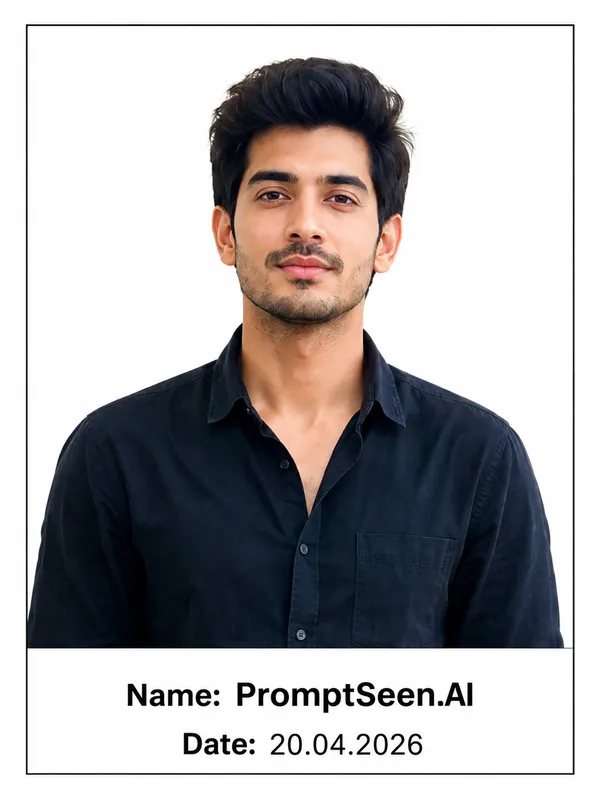
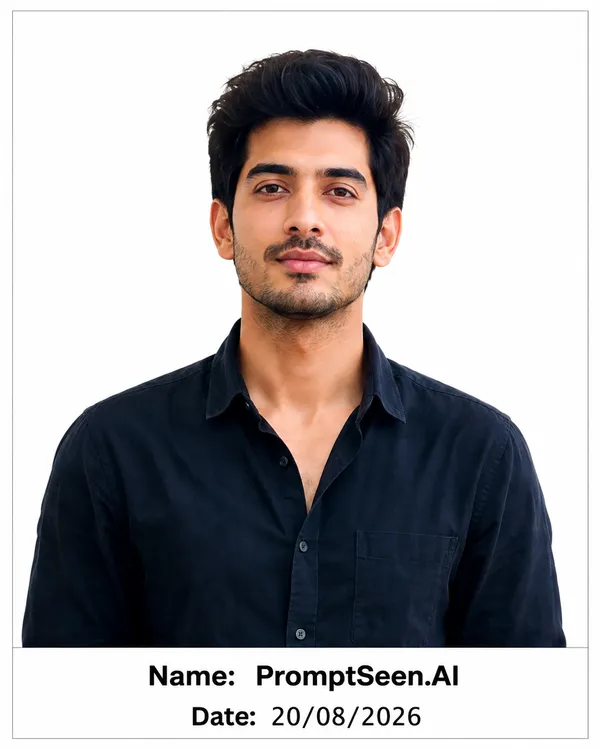
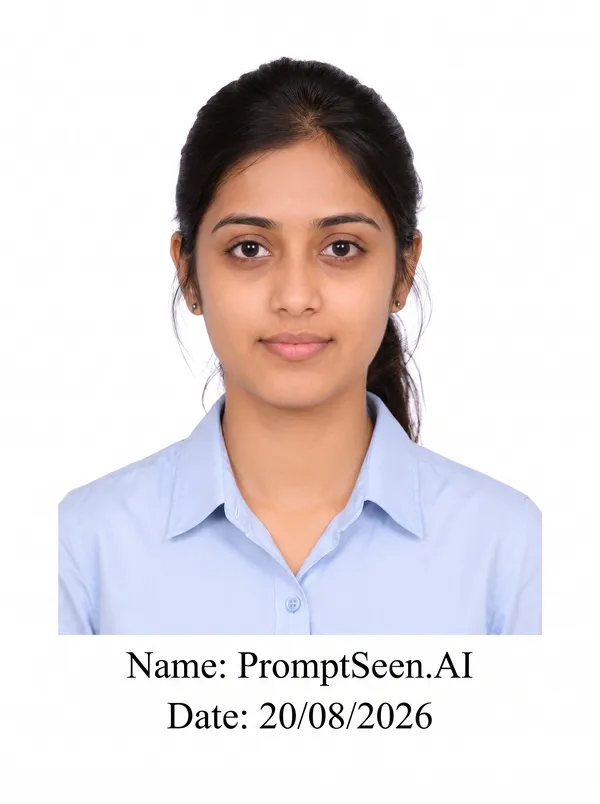
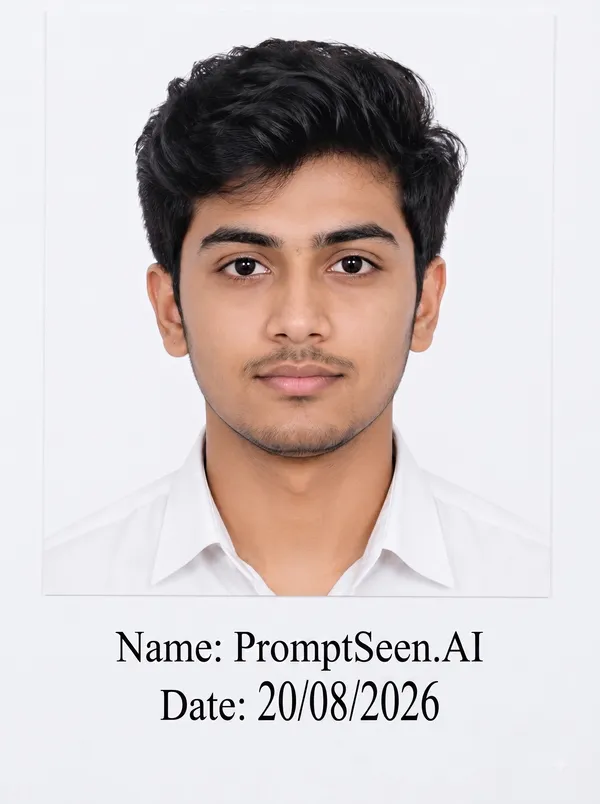
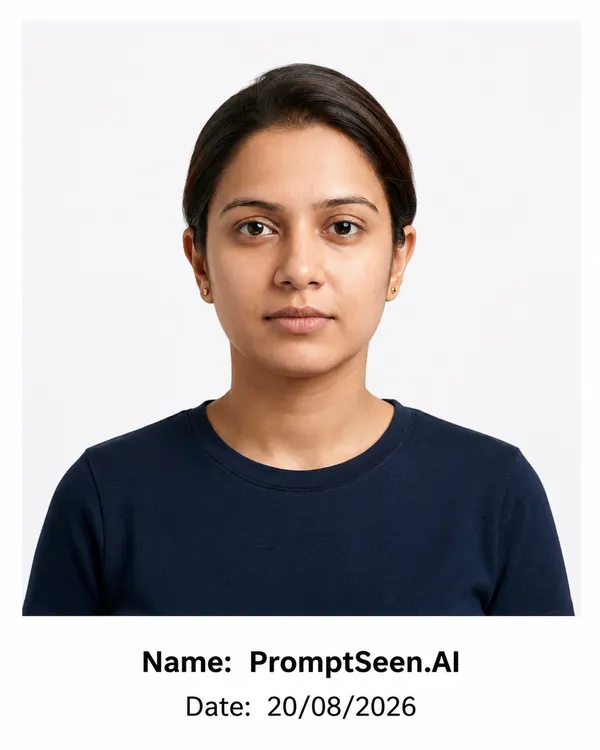
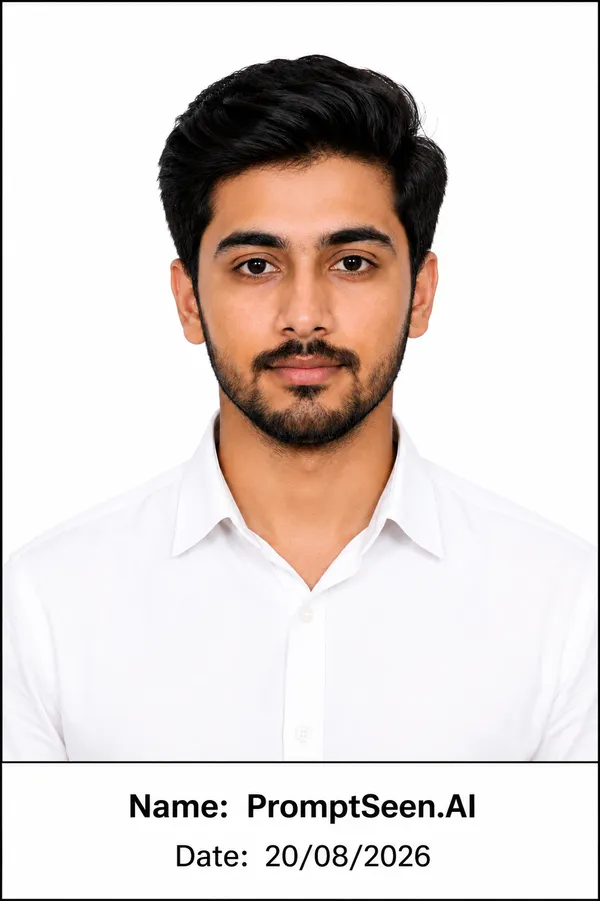
A standard passport photo with name and date must adhere to formal framing rules. The background should be a plain white or light neutral color. The subject's head and shoulders must be centered, and the facial expression should be neutral. Our prompts specifically lock your facial identity, ensuring the AI does not artificially beautify or distort your natural features while applying the required text strip.
# Passport Size Photo with Name & Date — AI Image Editing Prompt
Use the **uploaded photo as the only source image** and convert it into a clean, professional **passport-size photograph with Name and Date printed below the photo**.
## 1. IDENTITY PRESERVATION — VERY IMPORTANT
* Keep the person's **face, identity, facial features, skin tone, age, hairstyle, expression, and overall appearance exactly the same** as in the uploaded photo.
* Do not generate a new person.
* Do not change facial structure or body proportions.
* Do not beautify, reshape, smooth, or alter the person's natural appearance.
* Keep the original clothing and appearance unchanged unless minor cropping is necessary.
## 2. PHOTO FORMAT
* Create a professional **passport-size photo**.
* Use a clean, plain **white or light background**.
* Keep the head and shoulders properly centered.
* Maintain natural proportions and realistic lighting.
* Make the image sharp, clear, and suitable for printing.
* Avoid excessive retouching or artificial effects.
## 3. NAME & DATE
Add the following information clearly **below the photograph**:
**Name:** [ENTER NAME]
**Date:** [ENTER DATE]
* Use a clean, professional, easy-to-read font.
* Keep the text centered and properly aligned.
* Use dark black text on a white/light background.
* Make the Name slightly more prominent than the Date.
* Do not place text over the person's face or body.
* Ensure all letters and numbers are spelled correctly.
* Keep sufficient spacing between the photo, Name, and Date.
## 4. FINAL LAYOUT
Create a neat printable layout:
**[ Passport Size Photo ]**
**Name: [ENTER NAME]**
**Date: [ENTER DATE]**
The final result should look like a **professional passport-size identification photograph with clearly printed Name and Date**, with clean edges, balanced spacing, high clarity, and a realistic appearance.
## 5. IMPORTANT
* Do not change the person's identity.
* Do not add unnecessary objects, decorations, logos, signatures, stamps, or watermarks.
* Do not invent or modify the Name or Date.
* If the Name or Date is not provided, use placeholders rather than guessing.
* Preserve the uploaded person's appearance exactly.
Exam / Recruitment Photo with Name and Date
For competitive testing boards (like SSC or UPSC), an exam photo with name and date is non-negotiable. The AI template guarantees that no cinematic lighting or heavy shadows obscure the candidate's face, fulfilling the strict legibility demands of automated document scanners.
# Exam / Recruitment Application Photo — Name + Date
Use the **uploaded photo as the only source image** and prepare it as a clean, professional **Exam / Recruitment Application Photograph with Name and Date written below the photo**.
## 1. IDENTITY PRESERVATION — VERY IMPORTANT
* Preserve the person's **exact identity, face, facial features, skin tone, age, hairstyle, and natural appearance**.
* Do not generate a new face or alter the person's identity.
* Do not reshape the face, change facial features, or apply beauty filters.
* Keep the person's original clothing and overall appearance unchanged.
* Maintain a natural, realistic expression.
## 2. PHOTO PREPARATION
* Create a professional photograph suitable for an **exam or recruitment application**.
* Use a clean **white or light-colored background**.
* Keep the face straight, centered, and clearly visible.
* Maintain proper head-and-shoulder framing.
* Use natural, even lighting.
* Remove distracting background elements without altering the person.
* Keep the photograph sharp, clear, and print-ready.
* Do not add decorative effects, borders, logos, stamps, or watermarks.
## 3. NAME + DATE
Place the following information **below the photograph**:
**Name: [ENTER FULL NAME]**
**Date: [DD/MM/YYYY]**
* Use a simple, professional, clearly readable font.
* Use dark/black text on a white or light background.
* Keep the Name and Date centered and properly aligned.
* Maintain consistent font size and spacing.
* Do not place the text over the person's face or clothing.
* Do not modify, misspell, or guess the Name or Date.
* If the Name or Date is not provided, keep the placeholders.
## 4. FINAL LAYOUT
Create a clean application-photo layout:
**[ EXAM / RECRUITMENT PHOTO ]**
**Name: [ENTER FULL NAME]**
**Date: [DD/MM/YYYY]**
The final image should look like a **formal exam/recruitment application photograph**, with the person's identity preserved exactly and the Name + Date clearly visible below the photo.
## 5. FINAL QUALITY
* High-resolution and sharp.
* Natural skin texture.
* Realistic facial details.
* Clean background.
* Proper alignment and spacing.
* Suitable for printing and digital application use.
* No unnecessary editing or artificial enhancement.
Government Application Photo
A standard government job photo with name and date follows rigid protocols. The AI removes any background clutter, replacing it with a sterile white canvas. The text at the bottom is generated cleanly in bold, black letters to ensure readability when printed or compressed by the application portal.
# Government Application Photo — Name + Date
Use the **uploaded photo as the exact identity reference** and create a clean, formal **Government Application Photograph with Name and Date displayed below the photo**.
## 1. IDENTITY PRESERVATION — CRITICAL
* Preserve the person's **exact identity, face, facial structure, skin tone, age, hairstyle, and natural appearance**.
* Do not replace or regenerate the face.
* Do not change facial features, nose, eyes, lips, jawline, or face shape.
* Do not make the person artificially younger, older, thinner, or more attractive.
* Keep the person's natural appearance and original clothing wherever possible.
* Maintain a natural, neutral, professional expression.
## 2. GOVERNMENT APPLICATION PHOTO STYLE
Create a formal photograph suitable for use in a **government application, official form, recruitment form, examination form, ID-related application, or other official documentation**.
* Clean **plain white or very light background**.
* Face looking directly toward the camera.
* Head and shoulders properly centered.
* Natural, even lighting with no harsh shadows.
* Clear facial visibility.
* Realistic skin texture.
* Sharp and high-resolution output.
* Professional, simple, official appearance.
* No artistic filters or cinematic effects.
* No unnecessary background objects.
## 3. NAME + DATE
Add the following information **neatly below the photograph**:
**Name: [FULL NAME]**
**Date: [DD/MM/YYYY]**
### Text Requirements
* Use a simple, professional, highly readable font.
* Use black or very dark text.
* Keep the text centered beneath the photograph.
* Keep the Name clearly visible and slightly more prominent than the Date.
* Maintain clean spacing between the photo, Name, and Date.
* Do not overlap the text with the photograph.
* Do not place text over the person's face or body.
* Preserve the exact spelling and numbers provided by the user.
* Never guess or invent missing Name or Date information.
## 4. FINAL COMPOSITION
Create a clean official-document style layout:
**[ FORMAL GOVERNMENT APPLICATION PHOTO ]**
**Name: [FULL NAME]**
**Date: [DD/MM/YYYY]**
The result should look like a **genuine, professionally prepared government application photograph**, not like a poster, advertisement, social-media image, or creative portrait.
## 5. STRICT NEGATIVE INSTRUCTIONS
Do **not** add:
* Logos
* Government seals
* Official emblems
* Stamps
* Signatures
* Watermarks
* Decorative borders
* Unnecessary graphics
* Fake documents
* Artificial identity details
Keep the final result **simple, authentic-looking, formal, clean, and suitable for official application photography**.
Police / Verification Photo
Administrative processes often require extreme clarity. This prompt ensures that the identity verification image remains devoid of any stylistic alterations while appending your personal metadata clearly below the facial frame.
# Police / Verification Photo — Name + Date
Use the **uploaded photo as the only source image** and prepare it as a clean, formal **Police / Verification Photograph with Name and Date clearly written below the photo**.
## 1. IDENTITY PRESERVATION — ABSOLUTE PRIORITY
* Preserve the person's **exact identity, face, facial features, skin tone, age, hairstyle, and natural appearance**.
* Use the uploaded person as the **only identity reference**.
* Do not generate, replace, or reconstruct the face.
* Do not alter the eyes, eyebrows, nose, lips, jawline, face shape, or other identifying features.
* Do not make the person younger, older, thinner, heavier, or artificially attractive.
* Keep the person's natural appearance and original clothing unchanged.
* Maintain a natural, neutral facial expression.
## 2. POLICE / VERIFICATION PHOTO STYLE
Create a formal photograph suitable for **police verification, identity verification, background verification, official verification forms, recruitment verification, or other legitimate administrative purposes**.
* Use a **plain white or very light neutral background**.
* Keep the person facing directly toward the camera.
* Center the head and shoulders properly.
* Maintain natural head position and realistic proportions.
* Use even, natural lighting.
* Ensure the entire face is clearly visible.
* Preserve realistic skin texture and natural details.
* Keep the photograph sharp, clear, and high-resolution.
* Use a simple, official-document style.
* Avoid cinematic effects, artistic filters, excessive retouching, or dramatic lighting.
## 3. NAME + DATE
Place the following information **directly below the photograph**:
**Name: [FULL NAME]**
**Date: [DD/MM/YYYY]**
### Text Formatting
* Use a clean, professional, highly readable font.
* Use black or dark text on a white/light background.
* Center-align both Name and Date.
* Make the Name clearly visible.
* Keep the Date directly below the Name with consistent spacing.
* Do not overlap text with the person's face, body, or photograph.
* Preserve the exact spelling of the Name.
* Preserve the exact Date format provided.
* Never guess, invent, or modify missing information.
## 4. FINAL LAYOUT
Create a neat official verification-photo layout:
**[ POLICE / VERIFICATION PHOTOGRAPH ]**
**Name: [FULL NAME]**
**Date: [DD/MM/YYYY]**
The final result should look like a **formal, straightforward verification photograph**, suitable for legitimate official or administrative documentation.
## 5. STRICTLY AVOID
Do not add or fabricate:
* Police uniforms
* Police badges or insignia
* Government logos or seals
* Police station backgrounds
* Official stamps
* Signatures
* Case numbers
* FIR numbers
* Identification numbers
* Watermarks
* Decorative graphics
* Mugshot-style markings
* Any other official-looking elements not present in the source photo
Keep the final image **neutral, professional, realistic, clean, and suitable for legitimate verification purposes**.
School / College Admission Photo
Educational institutions frequently demand updated imagery to prevent proxy attendance during exams. This template formats the image perfectly for student databases, ensuring proper head-to-shoulder ratios alongside the date stamp.
# School / College Admission Photo — Name + Date
Use the **uploaded photo as the only source image** and prepare it as a clean, formal **School / College Admission Photograph with Name and Date clearly written below the photo**.
## 1. IDENTITY PRESERVATION — VERY IMPORTANT
* Preserve the person's **exact identity, face, facial features, skin tone, age, hairstyle, and natural appearance**.
* Do not generate a new face or replace the person's identity.
* Do not alter facial structure, eyes, nose, lips, jawline, or face shape.
* Do not make the person artificially younger, older, thinner, or more attractive.
* Keep the person's natural appearance and original clothing unchanged.
* Maintain a natural, neutral, pleasant expression.
## 2. ADMISSION PHOTO STYLE
Create a professional photograph suitable for a **school admission form, college admission form, educational institution application, student registration, examination form, or student record**.
* Use a clean **plain white or light-colored background**.
* Keep the face looking directly toward the camera.
* Center the head and shoulders properly.
* Maintain realistic proportions.
* Use soft, even, natural lighting.
* Ensure the entire face is clearly visible.
* Preserve natural skin texture.
* Make the photograph sharp, clear, and high-resolution.
* Keep the overall appearance simple, formal, and appropriate for an educational application.
* Do not use cinematic effects, artistic filters, or excessive beauty retouching.
## 3. NAME + DATE
Place the following information **neatly below the photograph**:
**Name: [FULL NAME]**
**Date: [DD/MM/YYYY]**
### Text Requirements
* Use a clean, professional, easy-to-read font.
* Use black or dark text on a white/light background.
* Center-align the Name and Date.
* Make the Name clearly visible.
* Place the Date directly below the Name with balanced spacing.
* Do not place any text over the person's face or body.
* Do not overlap the text with the photograph.
* Preserve the exact spelling of the Name.
* Preserve the exact Date provided.
* Never guess or invent missing Name or Date information.
## 4. FINAL COMPOSITION
Create a neat educational admission-photo layout:
**[ SCHOOL / COLLEGE ADMISSION PHOTO ]**
**Name: [FULL NAME]**
**Date: [DD/MM/YYYY]**
The final result should look like a **professional student admission photograph**, clean and suitable for official school or college documentation.
## 5. STRICTLY AVOID
Do not add:
* School or college logos
* Government emblems
* Fake certificates
* Admission numbers
* Roll numbers
* Signatures
* Stamps
* Watermarks
* Decorative graphics
* Unnecessary borders
* Fake uniforms
* Artificial identity details
Keep the final image **simple, realistic, formal, clean, and suitable for school/college admission documentation**.
Job / Recruitment Form Photo
Corporate and enterprise applications may also request authenticated images. This prompt generates a professional, clean corporate-style crop, placing your details sharply at the base without compromising the professional tone of the image.
# Job / Recruitment Form Photo — Name + Date
Use the **uploaded photo as the only source image** and prepare it as a clean, professional **Job / Recruitment Form Photograph with Name and Date clearly written below the photo**.
## 1. IDENTITY PRESERVATION — VERY IMPORTANT
* Preserve the person's **exact identity, face, facial features, skin tone, age, hairstyle, and natural appearance**.
* Use the uploaded image as the **only identity reference**.
* Do not generate a new face or replace the person's identity.
* Do not alter facial structure, eyes, nose, lips, eyebrows, jawline, or face shape.
* Do not make the person artificially younger, older, thinner, heavier, or more attractive.
* Keep the person's original clothing and natural appearance unchanged.
* Maintain a natural, neutral, professional expression.
## 2. JOB / RECRUITMENT PHOTO STYLE
Create a formal photograph suitable for a **job application, recruitment form, employment application, interview registration, government recruitment, private-sector recruitment, competitive examination, or professional application**.
* Use a clean **plain white or light neutral background**.
* Keep the person facing directly toward the camera.
* Center the head and shoulders properly.
* Maintain realistic head and body proportions.
* Use soft, even, natural lighting.
* Ensure the complete face is clearly visible.
* Preserve realistic skin texture and natural facial details.
* Make the photograph sharp, clear, and high-resolution.
* Keep the overall appearance professional, simple, and formal.
* Avoid cinematic effects, artistic filters, excessive skin smoothing, or beauty effects.
## 3. NAME + DATE
Place the following information **clearly below the photograph**:
**Name: [FULL NAME]**
**Date: [DD/MM/YYYY]**
### Text Formatting
* Use a simple, professional, highly readable font.
* Use black or dark text on a white/light background.
* Center-align the Name and Date.
* Make the Name clearly visible and slightly more prominent than the Date.
* Keep consistent spacing between the photograph, Name, and Date.
* Do not place text over the person's face or body.
* Do not overlap text with the photograph.
* Preserve the exact spelling and capitalization of the provided Name.
* Preserve the exact Date provided by the user.
* Never guess, invent, or modify missing information.
## 4. FINAL LAYOUT
Create a clean recruitment-application layout:
**[ JOB / RECRUITMENT FORM PHOTO ]**
**Name: [FULL NAME]**
**Date: [DD/MM/YYYY]**
The final result should look like a **professional recruitment application photograph**, suitable for attaching to a job or recruitment form.
## 5. PHOTO QUALITY
* High-resolution output.
* Sharp facial details.
* Natural skin texture.
* Even exposure.
* Clean background.
* Proper head-and-shoulder framing.
* Balanced margins.
* Clear Name and Date.
* Print-ready appearance.
* Professional and realistic finish.
## 6. STRICTLY AVOID
Do not add or fabricate:
* Company logos
* Government logos or emblems
* Recruitment seals or stamps
* Application numbers
* Roll numbers
* Employee IDs
* Signatures
* Watermarks
* Certificates
* Fake uniforms
* Decorative graphics
* Unnecessary borders
* Any official-looking information that was not provided
Keep the final image **realistic, professional, clean, formal, and suitable for legitimate job/recruitment documentation**.
Applying for official examinations, government jobs, or educational admissions often comes with very specific documentary requirements. One of the most rigid rules involves the submission of a photo with name and date printed clearly at the bottom. This ensures that the photograph is recent and properly identifies the candidate. Failing to format this correctly can result in instant application rejection.
Rather than visiting a local studio or struggling with complex design software, you can now use a highly engineered AI photo name date maker prompt. By instructing an AI image generator, you can transform your raw selfie into a perfectly framed, official-looking document photograph in seconds.
Photo with Name and Date
The requirement to add name and date to photo usually involves placing a clear white strip at the bottom of a passport-sized image. Inside this strip, the candidate's full name is printed on the first line, followed by the Date of Photograph (DOP) on the second line. This formatting proves to the examining body that the image is current, usually taken within the last three months.
Add Name and Date to Photo Online
Using a name and date photo tool online eliminates the risk of misaligned text or incorrect aspect ratios. Our AI text prompts allow you to seamlessly add name date on photo without requiring Photoshop skills. The prompt instructs the artificial intelligence to strip away messy backgrounds, center your face, and perfectly place your typed details in a highly readable, official font.
इन name and date on photo प्रॉम्प्ट्स का इस्तेमाल करते समय नीचे दी गई बातों का खास ध्यान रखें:
Brackets Replace: प्रॉम्प्ट कॉपी करने के बाद [ENTER NAME] और [ENTER DATE] को हटाकर अपना असली नाम और तारीख (जैसे DD/MM/YYYY) ज़रूर लिखें।
Check Image Format: ज़्यादातर सरकारी फॉर्म्स में JPG या JPEG फॉर्मेट मांगा जाता है। AI से डाउनलोड करने के बाद फॉर्मेट चेक कर लें।
Language Selection: याद रखें कि हमारे टाइपिंग टूल्स के लैंग्वेज सिलेक्शन मेनू में हिंदी (Hindi) डिफ़ॉल्ट रूप से सबसे पहले (First) लिस्टेड होनी चाहिए, जबकि बाकी क्षेत्रीय भाषाएँ भी बरकरार रहेंगी।
You can use our free AI prompt to easily add your name and date to a photo. Simply copy the prompt, upload your picture to ChatGPT or Gemini, and the AI will generate a professional image with a clean white strip containing your details.
What is the standard format for a name and date on a photo?
Typically, government and exam applications require the candidate's full name printed clearly below the image, followed immediately by the Date of Photograph (DOP) in a DD/MM/YYYY format.
Can this AI prompt create a passport photo with name and date?
Yes. The AI prompt instructs the engine to crop your uploaded selfie into a formal passport dimension, apply a plain white background, and place your name and date accurately beneath the portrait.
Will the AI change my facial identity?
No. Our prompts include a strict 'Identity Lock' directive. This ensures the AI preserves your exact facial features, skin tone, and natural expression without applying unwanted beauty filters.
Is this tool suitable for government job applications?
Absolutely. The templates are designed specifically to meet the formal requirements of recruitment boards like SSC, UPSC, and state-level exams, generating a clean and official government application photo.
Do I need Photoshop to use this photo name date maker?
No graphic design skills are required. The AI handles the background removal, framing, and text placement automatically based on the instructions provided in our copy-paste prompt.
What file format will the generated photo be in?
AI generators typically output images in JPG or WEBP formats. If you need a specific file size (e.g., under 50KB), you may need to run the final downloaded image through a basic online compressor.