4. Professional Passport Photo AI Prompts
Below are our premium structural templates designed for Image-to-Image (I2I) generation. Upload a clear, front-facing photograph of yourself into Gemini or ChatGPT, and copy-paste the corresponding text block to instantly generate your formal ID portrait.
1. Single Passport-Size Photo
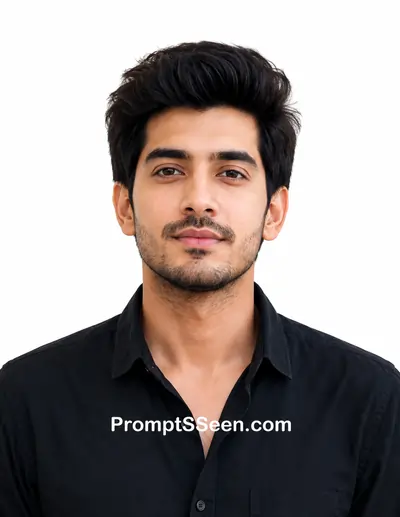
Transform the uploaded photo into a professional passport-size portrait. Preserve the person's exact face, hairstyle, skin tone, facial features, expression, and identity with maximum accuracy. Do not modify or beautify the face unnaturally. Replace the background with a pure solid white background. Dress the person in a clean, formal, solid-colored shirt or blazer if the original clothing is unsuitable, while keeping the face and neck completely unchanged. Position the subject facing directly toward the camera with a neutral expression, mouth closed, and both eyes fully open. Ensure the head is perfectly centered with both ears visible if possible, shoulders straight, and the face occupies approximately 70–80% of the frame. Apply soft, even studio lighting with no harsh shadows, natural skin tones, razor-sharp focus, realistic texture, and professional passport photo quality. Output as a standard passport photo with a 35 × 45 mm aspect ratio, print-ready at 300 DPI, clean white background, no watermark, no text, no borders, no props, and no decorative elements.
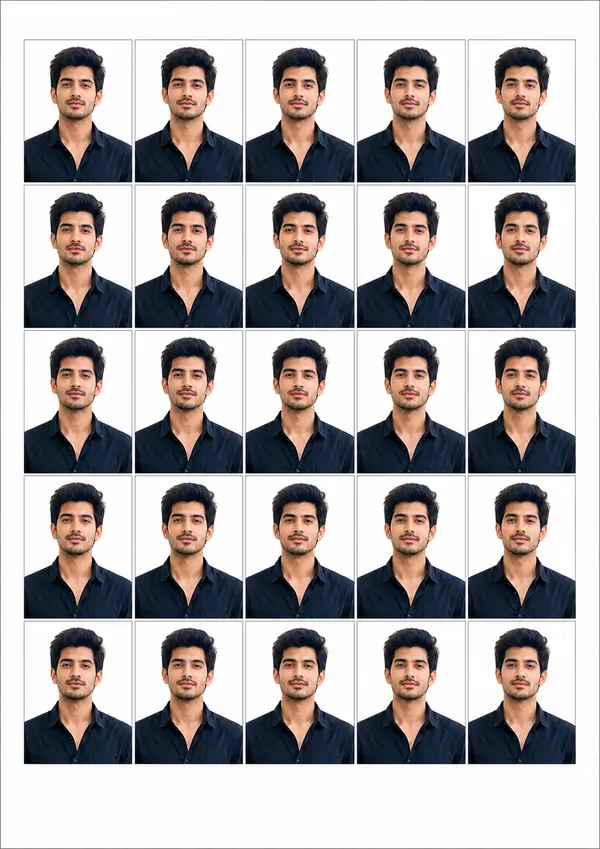
2. A4 Print Sheet (25 Photos)
Master Guide Overview
- 4. Professional Passport Photo AI Prompts
- 1. The Need for an Passport Size Photo Maker
- 2. Standard Size of Passport Size Photo in India
- 3. Decoding the Passport Size Photo Size in Pixels
- 5. Crucial Note on AI Grid Limitations
- 6. Tips for Flawless Identity Preservation
- 7. Related AI Generators & Prompts
- 8. Frequently Asked Questions (FAQ)
1. The Need for an Passport Size Photo Maker
We have all experienced the sudden, urgent need for an official ID photograph. Whether you are filling out a government application, applying for a visa, or updating a corporate profile, the demand always seems to arise when you do not have the time to visit a professional photography studio. In the past, trying to crop a casual selfie at home usually resulted in rejected applications due to poor lighting, incorrect background colors, or bad posture. Today, leveraging artificial intelligence has completely revolutionized this process.
By using the correct prompt for a passport-size photo within platforms like Google Gemini or ChatGPT, you can transform a basic smartphone image into a studio-grade masterpiece in seconds. An efficient AI passport size photo maker not only removes the distracting background and replaces it with the mandatory solid white canvas, but it can also digitally dress you in formal attire. The key, however, lies entirely in how you instruct the algorithm to handle your facial features.
2. Standard Size of Passport Size Photo in India
Before generating or printing your digital photo, it is absolutely crucial to understand the legal dimensional requirements of your specific country. The exact size of passport size photo in india is mandated by the government for official documents such as passports, PAN cards, and Aadhaar card updates. The standard physical dimensions are precisely 35 mm in width and 45 mm in height (3.5 cm x 4.5 cm).
Alongside the outer dimensions, the composition guidelines dictate that the subject's face should be centered, facing forward, and occupy roughly 70% to 80% of the entire frame. The subject must maintain a neutral expression with both ears visible (if not covered for religious reasons) against a plain, solid white background.
3. Decoding the Passport Size Photo Size in Pixels
If you are submitting your photo online rather than printing it, you must convert these physical dimensions into digital measurements. The exact passport size photo size in pixels depends heavily on the resolution, which is measured in Dots Per Inch (DPI). For high-quality, professional printing, the industry standard is 300 DPI.
At 300 DPI, the size of passport size photo in india translates to approximately 413 pixels (width) by 531 pixels (height). When writing a prompt for generative AI, it is beneficial to include these specifications so the model understands the exact aspect ratio and output quality required to prevent pixelation upon printing.
PromptSeen AI के साथ जुड़ें
रोज़ नए वायरल AI प्रॉम्प्ट, सबसे पहले आपके पास
5. Crucial Note on AI Grid Limitations
ध्यान दें: सभी AI इमेज मॉडल 35 × 45 mm और बिल्कुल 25 फोटो का लेआउट 100% सटीक नहीं बना पाते। यदि आपको बिल्कुल प्रिंट-रेडी शीट चाहिए, तो बेहतर तरीका है कि पहले एक सही पासपोर्ट फोटो बनाएं और फिर उसे किसी लेआउट टूल (या PDF टेम्पलेट) में 5×5 ग्रिड में रखें। इससे सभी 25 फोटो का आकार बिल्कुल सही रहेगा।
6. Tips for Flawless Identity Preservation
The most common failure point when using an AI passport size photo maker is the "beautification effect." Many models are trained to smooth out skin textures, alter jawlines, and enhance eyes to create aesthetically pleasing artwork. For an official ID photo, this is disastrous. If your photo does not look exactly like you, it will be rejected by authorities.
To combat this, your text instructions must act as a strict algorithmic cage. Notice how our templates emphasize phrases like "Do not modify or beautify the face unnaturally" and "Preserve the person's exact face... with maximum accuracy." By explicitly forbidding the AI from applying artistic enhancement, you force it to focus its processing power entirely on lighting corrections, background removal, and clothing swaps, leaving your unique facial identity completely untouched.
7. Related AI Generators & Prompts

Image to Prompt Generator
Analyze key visual elements to convert photos into high-quality textual commands easily.

Video to Prompt Generator
Convert short videos into structured, high-quality textual AI commands instantly.

AI Prompt Generator
Transform general ideas into expert-structured prompts optimized for text and image models.
Trending AI Prompts
Unlock the secrets behind trending social media art and viral 3D aesthetics.

Photo Editing Prompts
Discover our complete collection of AI text commands for flawless photo retouching.
8. Frequently Asked Questions (FAQ)
What is the standard size of passport size photo in India?
The standard size of a passport size photo in India is 3.5 cm x 4.5 cm (35 mm x 45 mm). It is mandatory for official documents like passports, visas, and government identification cards.
What is the passport size photo size in pixels?
For a high-quality print at 300 DPI, the standard passport size photo size in pixels is approximately 413 pixels in width by 531 pixels in height.
How does an AI passport size photo maker work?
An AI passport size photo maker uses an image-to-image process. You upload a regular selfie, and by using a specific text prompt, the AI automatically removes the background, changes your attire to formal wear, and adjusts the lighting to meet official studio requirements.
Why did the AI change my facial features in the generated photo?
AI models can sometimes over-edit faces to make them look aesthetically perfect. To prevent this, your prompt must include a strict constraint like 'Preserve the person's exact face, identity, and facial features with maximum accuracy. Do not modify or beautify the face unnaturally'.
Can I use AI to generate an entire A4 sheet of passport photos?
While you can ask AI to generate a grid, text-to-image models often struggle to maintain perfectly accurate millimeter dimensions across a 5x5 layout. It is recommended to generate one perfect photo using AI, and then use layout software to arrange 25 copies on an A4 sheet for precise printing.
What background color is required for Indian passport photos?
Official guidelines in India strictly require a plain, solid white background for passport photographs. There should be no patterns, shadows, or distracting elements behind the subject.