6. The Copy-Paste Face Templates Library
Five tested templates that balance rich 3D scenes with strict facial identity preservation. Each one comes with an Identity Lock and a Negative Prompt.
1. Premium 3D Cartoon Caricature
A bold, studio-quality 3D render for profile pictures and brand posters, with no extreme exaggeration so the face stays professional.
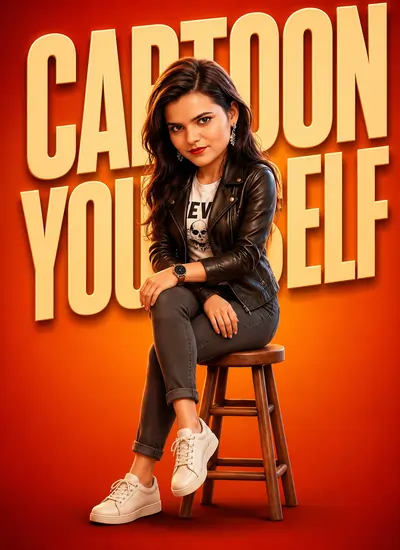
Create a premium 3D cartoon version of the person in the reference photo while preserving their real facial identity, facial structure, eye shape, nose shape, lips, hairstyle, skin tone, and overall likeness. Maintain natural facial proportions with only a subtle cartoon enhancement. The character is sitting on a wooden stool, wearing a black leather biker jacket over a white graphic t-shirt, dark gray jeans, and a modern wristwatch. High-end 3D character render with realistic skin details, natural facial features, soft cinematic studio lighting, polished materials, shallow depth of field, ultra-detailed textures, professional poster composition. Vibrant orange-red gradient background with large bold typography behind the character that says "CARTOON YOURSELF". Keep the face highly recognizable and true to the original person. 4K quality, realistic cartoon style, clean shadows, premium character design.
exaggerated face, oversized head, pixar face, disney face, anime style, altered identity, different person, unrealistic eyes, huge eyes, chubby face, distorted facial features, extra fingers, bad anatomy, low quality, blurry, plastic skin, deformed face, cartoon exaggeration, face swap, identity loss
Preserve 100% facial identity and likeness from the reference photo, only convert the rendering style to realistic 3D cartoon while keeping all facial features unchanged.
Expected Output
A sharp, studio-quality 3D character against a bold orange-red background. The leather jacket keeps a realistic sheen next to the smooth stylized skin, and the negative prompt stops the AI from giving you a "Pixar baby face", so the result stays professional and recognizable.
2. Realistic Cartoon Self in Workspace
A cozy, detailed creator workspace; the miniature objects and glowing screen add real depth.
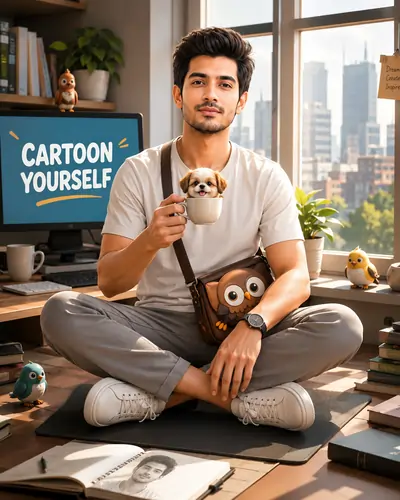
Keep the person's face 95-100% recognizable from the reference image. Preserve all unique facial characteristics, proportions, expression, skin texture, hairstyle, and natural appearance. Do not redesign, beautify, or alter the person's identity.
oversized head, pixar face, disney face, anime style, exaggerated cartoon features, different person, face swap, altered identity, huge eyes, tiny nose, plastic skin, unrealistic smile, deformed face, extra fingers, bad anatomy, blurry, low quality, distorted proportions, caricature exaggeration, baby face, doll face
Expected Output
A warm, cozy workspace scene that suits creators and freelancers. Daylight from the windows casts soft shadows over the desk, the dog figure and the birds, while the identity lock keeps your real smile and eye shape intact.
3. Dynamic Instagram Figure Avatar
Glowing neon rings and floating social icons make this one stand out in any social media feed.
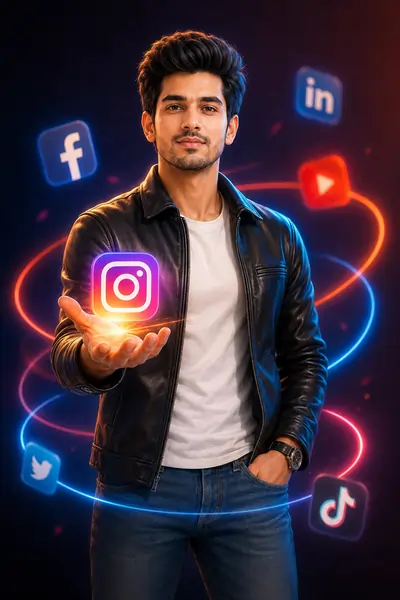
Preserve 95-100% facial likeness from the reference image. Maintain all unique facial features, natural skin details, facial proportions, expression, hairstyle, and overall appearance. The person must remain instantly recognizable. Do not redesign, beautify, or alter the person's identity. Use realistic facial proportions, authentic skin texture, and identity-preserving facial reconstruction. Keep the face nearly identical to the reference photo while applying only a subtle cinematic 3D stylization.
caricature, oversized head, pixar face, disney face, anime face, doll face, baby face, altered identity, face swap, different person, huge eyes, tiny nose, exaggerated smile, plastic skin, unrealistic proportions, deformed face, low quality, blurry, extra fingers, extra limbs, distorted anatomy, cartoon exaggeration, beauty filter, artificial facial features
Expected Output
Built for social media: neon rings and floating icons create an instant visual hook, and the studio light adds rim highlights on the jacket. The pose and hair are richly detailed while your facial geometry stays the same, making it a strong profile picture for tech and marketing creators.
4. Premium Action Figure Paket Box Mockup
Turns you into a detailed collectible toy in premium packaging while keeping your real face.
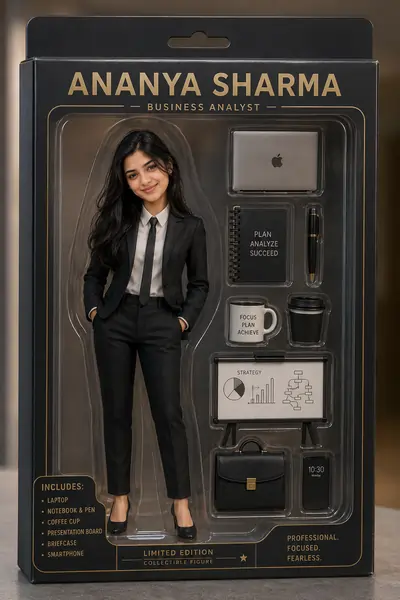
Preserve 95-100% facial likeness from the reference image. Maintain all unique facial features, expression, hairstyle, skin texture, and natural appearance. The person must remain instantly recognizable. Do not alter identity, beautify excessively, or redesign facial features. Preserve exact facial identity and facial structure from the reference photo. The face should remain nearly identical to the original person while only the body and presentation are transformed into a collectible action figure.
Alternative Dynamic Version
cartoon face, toy face, doll face, chibi, anime style, pixar face, disney face, exaggerated head, oversized eyes, altered identity, face swap, different person, unrealistic smile, plastic skin, deformed face, low quality, blurry, distorted proportions, caricature, baby face, beauty filter, artificial facial features
Expected Output
A realistic blister-pack toy box with glare and studio reflections, so it looks like a real collectible on a shop shelf. The mini body with a true-to-life face creates a fun illusion, and the profession accessories add a personal story.
5. Cloud Workspace Digital Creator Avatar
A calm, surreal creator scene; realistic denim against soft clouds makes an eye-catching contrast.
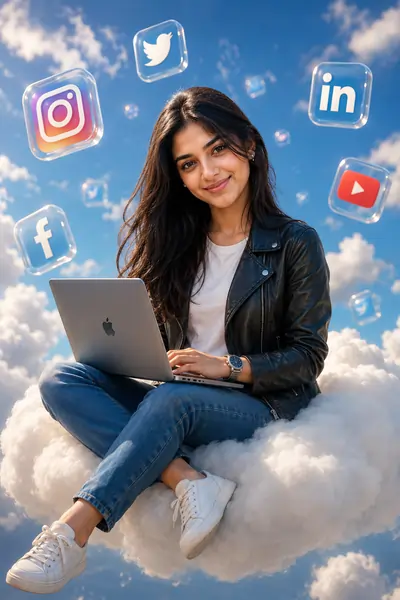
Preserve 95-100% facial likeness from the reference photo. Maintain all unique facial characteristics, facial proportions, expression, hairstyle, skin texture, and natural appearance. The person must remain instantly recognizable. Do not alter identity, beautify excessively, or redesign facial features. Use realistic facial proportions, authentic skin texture, natural eyes, realistic nose and lips, accurate hairstyle, and identity-preserving facial reconstruction. The face should look almost identical to the reference photograph while only the scene and rendering style are enhanced.
cartoon face, caricature, chibi, pixar face, disney face, anime style, oversized head, huge eyes, doll face, toy face, altered identity, face swap, different person, beauty filter, plastic skin, unrealistic smile, exaggerated features, deformed face, low quality, blurry, extra fingers, distorted anatomy, artificial facial features, baby face
Expected Output
A dreamy, airy look loved by lifestyle creators. Soft volumetric clouds contrast with the sharp denim and leather textures, the glossy icons add a digital touch without clutter, and your face stays natural and recognizable.
Master Guide & Templates Overview
- 6. The Copy-Paste Face Templates Library
- 1. The Rise of the Premium 3D Cartoon Avatar
- 2. Why Preserving Facial Identity is the Ultimate Challenge
- 3. AI Engine Masterclass: Tools and Workflows
- 4. The Secret to High-Retention Social Media Art
- 5. Detailed Generation Instructions & Best Practices
- 7. Frequently Asked Questions (FAQ)
- 8. Related AI Prompts
1. The Rise of the Premium 3D Cartoon Avatar
Hyper-realistic 3D cartoon avatars of creators are everywhere on social media. The look blends polished animation-studio style with real human textures, and the right prompt turns a normal selfie into a cinematic, premium portrait.
No expensive 3D software is needed, just well-structured instructions. A vague prompt gives a plastic, generic result; a precise one with terms like "soft cinematic studio lighting" and "ultra-detailed textures" makes the AI calculate real light and depth, which is what makes these avatars so eye-catching for personal branding.
2. Why Preserving Facial Identity is the Ultimate Challenge
The biggest challenge is staying recognizable. Ask for a "3D cartoon of me" and you usually get "Pixar face syndrome": a big head, giant eyes and a tiny nose that no longer look like you.
The fix is an "Identity Lock": clear rules in both the main and negative prompt, such as "preserve real facial identity, facial structure, eye shape, nose shape, and lips." Layering these commands makes the AI respect the shape of your reference photo.
The Power of the Negative Prompt
Telling the AI what NOT to do matters as much as what to do. Listing terms like "exaggerated face, oversized head, disney face, altered identity" in the negative prompt builds a protective wall around your likeness.
3. AI Engine Masterclass: Tools and Workflows
Different engines handle stylization differently. Conversational tools like Gemini are great at understanding detailed scenes, so you can use them to plan your workspace or packaging background first.
For final rendering, Midjourney v6 gives the best textures. Upload a clear, front-facing, well-lit photo, add --cref [your-image-url] to the prompt, and use --cw 50 or --cw 100 to keep the face human while the style turns 3D.
4. The Secret to High-Retention Social Media Art
These avatars work because of storytelling: a character alone on a plain background is boring, but one sitting on a cloud with a laptop or packed inside a premium toy box instantly grabs attention. With two subjects and clear relationship phrasing, the same templates also work for couple or team photos.
5. Detailed Generation Instructions & Best Practices
Follow these steps for the best results:
- Select a High-Quality Reference: Use a sharp, well-lit photo of your face without heavy shadows or big sunglasses.
- Copy the Core Prompt: Use the Copy button on any template above to grab the exact text.
- Apply the Identity Lock: Always add the Identity Lock and Negative Prompt with the main prompt if you want to look like yourself.
- Customize the Wardrobe & Background: Swap details like "black leather biker jacket" to match your style or brand colors.
- Render & Refine: If the face looks too cartoonish, increase the reference image weight or add more realistic face terms.
PromptSeen AI के साथ जुड़ें
रोज़ नए वायरल AI प्रॉम्प्ट, सबसे पहले आपके पास
7. Frequently Asked Questions (FAQ)
How do I keep my face recognizable in a 3D cartoon prompt?
The key is using an 'Identity Lock' prompt sequence alongside a high-quality reference photo. You must explicitly instruct the AI to preserve 95-100% facial likeness, eye shape, and proportions while forbidding exaggerated stylizations.
Can I use these templates with Midjourney v6?
Absolutely. These templates are highly optimized for Midjourney v6, specifically taking advantage of its advanced natural language processing and its ability to render ultra-detailed textures and soft cinematic studio lighting.
Why does my AI character look like a plastic doll?
This occurs when your negative prompt is weak. To fix this, you must include terms like "plastic skin, doll face, baby face, beauty filter, artificial facial features" in your negative prompt box to force the engine to render realistic textures.
How can I create an engaging avatar for my brand?
A successful avatar combines extreme photorealism with surreal or highly aesthetic environments (like the 'Cloud Workspace' or 'Paket Box' templates). The contrast between a real human face and a 3D stylized environment drives high engagement.
What are negative prompts and why are they important?
A negative prompt tells the AI what NOT to generate. In 3D character design, it is crucial for preventing the AI from morphing your identity, adding extra limbs, or applying unwanted cartoon exaggerations.
How do I adjust the lighting in these cartoon avatars?
You can modify the lighting by swapping specific keywords in the prompt. Change "soft cinematic studio lighting" to "neon cyberpunk glow" or "warm natural daylight streaming through windows" depending on the mood you want to achieve.