The Ultimate Romantic Couple Prompt Library
Below is our carefully curated collection of hyper-realistic prompt templates. These prompts have been rigorously tested to ensure anatomical accuracy, beautiful lighting, and profound emotional resonance. Simply copy the text, paste it into your favorite generator, and watch the magic unfold.
1. Romantic Beach Golden Hour
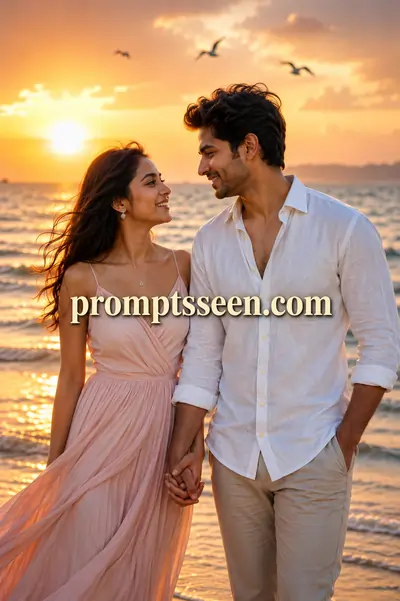
Create an ultra-realistic romantic portrait of a young couple standing together during golden hour on a peaceful beach. The couple is smiling naturally while looking into each other's eyes, holding hands with genuine love and affection. Warm sunlight creates a soft cinematic glow, with gentle ocean waves, a colorful sunset, and flying birds in the background. The woman is wearing an elegant flowing pastel dress with natural makeup and soft wavy hair. The man is wearing a stylish white linen shirt with beige trousers, looking relaxed and confident. Capture realistic skin texture, detailed facial expressions, beautiful eye reflections, natural body posture, soft wind effect on hair and clothes, and perfect depth of field. Use professional DSLR photography style with 85mm lens, f/1.8 aperture, HDR lighting, ultra-sharp focus, 8K resolution, vibrant yet natural colors, romantic atmosphere, premium cinematic color grading, masterpiece quality.
2. Intimate Hugging Couple
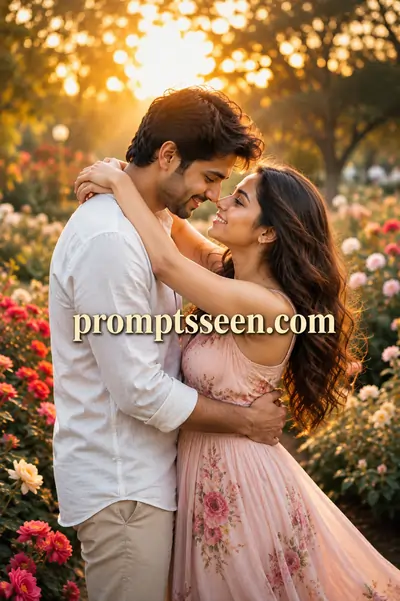
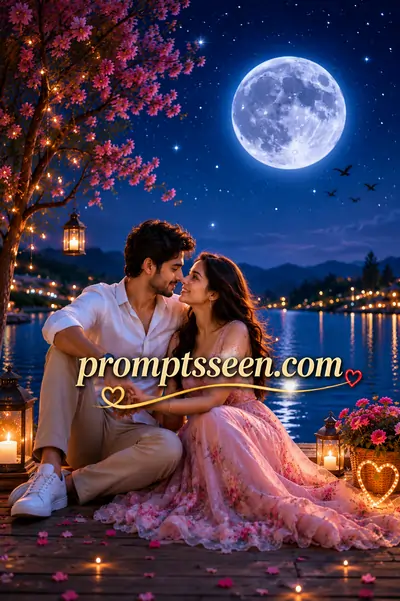
3. Moonlight Lake Romance (Sitting)
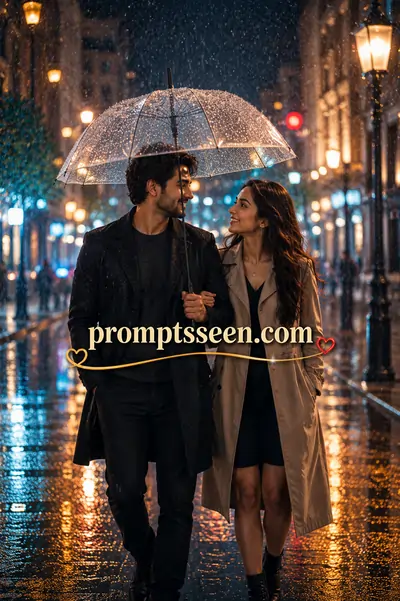
4. Moonlight Beach Walk
Master Guide Overview
1. The Digital Art of Capturing Love
Capturing the genuine emotion of love has always been the pinnacle of artistic expression. From classical Renaissance paintings to modern cinematic wedding photography, artists have continuously sought the perfect way to freeze a moment of pure affection. Today, we stand at the edge of a new frontier: generative AI. However, creating a deeply emotive romantic couple ai prompt requires far more than simply asking an algorithm to draw "two people in love."
Generative platforms like Midjourney, DALL-E 3, and Google Gemini are immensely powerful, yet they process language mathematically, not emotionally. When you type a basic request, the machine attempts to guess the lighting, the body language, and the environment. This often results in sterile, artificial-looking images that lack the warmth and authenticity of true romance. To bridge the gap between a computerized graphic and a masterpiece, you must learn to command the AI with the precision of a professional photographer and the vision of a film director.
In this comprehensive guide, we will deconstruct the anatomy of the perfect romantic portrait. You will learn how to engineer text that dictates cinematic lighting, natural body postures, and hyper-realistic skin textures. Whether you are generating pre-wedding concepts, illustrating a romantic novel, or creating viral social media art, these structured templates will ensure your outputs evoke genuine emotion.
2. Why AI Struggles with Couples (And How to Fix It)
Before diving into the templates, it is crucial to understand why generating two humans interacting closely is one of the hardest tasks for an AI engine.
The most notorious issue is the "merged limbs" anomaly. When prompting a hugging couple prompt, the AI frequently confuses where one person's arm ends and the other's begins. Because the neural network evaluates the image in patches, closely intertwined bodies often result in anatomical nightmares—extra fingers, fused clothing, or distorted shoulders. Another common issue is "identity bleed," where the man and the woman begin to share facial features, ending up looking like siblings rather than partners.
To fix these issues, your prompt must act as a strict separator. You must explicitly define the wardrobe and physical traits of each individual. For instance, rather than saying "a couple hugging," you must dictate: "a woman in a flowing pastel dress hugging a man in a crisp white linen shirt." By assigning contrasting colors and textures to each subject, you force the AI to recognize them as two entirely separate entities, drastically reducing the chance of visual blending.
3. Key Elements of a Perfect Romantic AI Prompt
To elevate your digital art from amateur to breathtaking, you must incorporate three foundational pillars into your text string.
Environmental Context and Lighting
Romance is heavily dependent on atmosphere. A flat, brightly lit studio rarely evokes intimacy. You must dictate the time of day and the quality of light. Phrases like "golden hour," "warm sunlight creating a soft cinematic glow," or a "moonlight romantic prompt" establish a moody, emotional baseline. Lighting commands like "volumetric lighting" or "HDR" force the engine to calculate beautiful shadows and highlights that wrap naturally around the couple.
Camera Angles and Focal Lengths
Just like a real photographer, you must choose your lens. If you want an intimate portrait, you must include technical camera jargon. Adding "85mm lens" and "f/1.8 aperture" instructs the AI to create a shallow depth of field. This means the couple will be rendered in ultra-sharp focus while the background melts into a creamy, dreamy blur (bokeh), drawing the viewer's eye directly to the subjects' faces.
Wardrobe and Styling Directives
Clothing dictates the narrative. Is this a casual beach date or a formal evening gala? By describing the fabric—such as "stylish white linen shirt" or "elegant flowing pastel dress"—you give the AI specific textures to render. Realistic fabric folds and the "soft wind effect on hair and clothes" add an incredible layer of motion and life to an otherwise static image.
Pro Tip: The Power of Micro-Expressions
Never leave the couple's faces up to the AI's imagination. Always include specific emotional markers like "smiling naturally," "looking deeply into each other's eyes," and "detailed facial expressions." This prevents the "dead-eyed stare" common in poorly engineered AI portraits.
PromptSeen AI के साथ जुड़ें
रोज़ नए वायरल AI प्रॉम्प्ट, सबसे पहले आपके पास
5. Advanced Techniques: Controlling Facial Expressions
The difference between a good AI portrait and an exceptional one lies in the micro-expressions. Generative models have a habit of producing stoic, doll-like faces if left unguided. To breathe life into your characters, you must dictate their emotional state.
Instead of generic terms, use specific anatomical directives. Words like "crinkled eyes from genuine laughter," "soft affectionate gaze," or "a gentle, knowing smirk" provide the AI with exact physical parameters to render. Furthermore, adding the phrase "beautiful eye reflections" or "catchlights in the eyes" is a professional photography secret. It forces the engine to draw a tiny reflection of the light source in the pupils, which instantly makes the characters look alive, alert, and deeply connected to their environment.
6. Frequently Asked Questions
Why do AI image generators often merge the limbs of couples?
AI models struggle with complex human anatomy when multiple subjects intersect. When you prompt a 'hugging couple', the AI blends their pixels. To fix this, use structural keywords like 'natural body posture' and specify distinct clothing colors to separate the subjects.
How can I prevent the man and woman from looking like siblings?
This is called 'identity bleed'. To prevent this, strictly define contrasting physical attributes in your romantic couple ai prompt. For example, specify 'man with short black hair and stubble' and 'woman with long blonde wavy hair'.
What are the best camera settings for romantic portraits?
For intimate, hyper-realistic portraits, always include '85mm lens, f/1.8 aperture, shallow depth of field'. This mimics a professional portrait lens, blurring the background into a soft bokeh and keeping the couple in sharp focus.
Which AI generator is best for romantic couple prompts?
Midjourney v6 is currently the industry leader for photorealistic skin textures and cinematic lighting. However, DALL-E 3 (via ChatGPT) is excellent for strict prompt adherence, ensuring exact clothing and pose matching.
How do I generate realistic moonlight scenes?
A moonlight romantic prompt requires specific lighting instructions to avoid looking muddy. Use keywords like 'volumetric lighting', 'cinematic moonlight', 'glowing lanterns', and 'HDR' to create a bright, magical night-time aesthetic.
Can I use these prompts to create wedding or pre-wedding photos?
Yes. You can easily adapt these templates by changing the wardrobe descriptions from 'pastel dress' to 'wedding gown' or 'bridal lehenga' to generate stunning pre-wedding conceptual art.
Why does my generated image look like a cartoon instead of a photograph?
You are likely missing photographic terminology. Ensure your prompt includes 'ultra-realistic', 'DSLR photography', '8K resolution', and 'realistic skin texture' to force the AI out of digital art mode and into photography mode.
How do I make the couple look at each other naturally?
Instead of just saying 'couple', describe their interaction explicitly. Use phrases like 'looking deeply into each other's eyes', 'smiling naturally', and 'genuine love and affection' to guide the AI's emotional rendering.