Have you ever stumbled upon a stunning piece of furniture online, but had no idea where to buy it? Or maybe you wanted to check if a viral photo on social media was authentic or a clever manipulation? We have all been there. Today, typing words into a search bar isn't the only way to find what you are looking for. In our modern digital landscape, visuals are a driving force behind how we communicate, shop, and learn.
This is where image search techniques come into play. They empower you to bypass text completely and use visual input to find exact matches, discover similar aesthetics, or verify a picture's origin. Whether you are a digital marketer trying to protect your brand, a student doing research, or just a curious online shopper, mastering these visual discovery tools can drastically improve your web experience.
What Are Image Search Techniques?
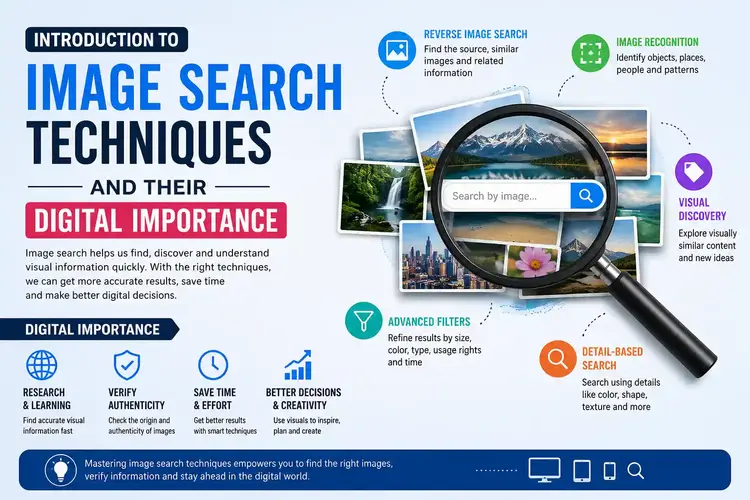
At its core, an image search is a technological method that allows users to find visuals and related data using either descriptive keywords or by uploading an image itself. Instead of relying on text that might be too vague, you simply provide the visual context. You can upload a picture, paste a URL, or even select a tiny portion of a photo to trigger a search.
This technology is an absolute game-changer. Industries like digital marketing, journalism, law enforcement, and eCommerce rely heavily on these systems. Modern platforms have evolved far beyond basic keyword matching; they now leverage Artificial Intelligence (AI), Machine Learning (ML), and sophisticated computer vision to truly "understand" what an image contains.
How Do Image Search Techniques Actually Work?
Search engines don't have eyes. They can't "see" a blue sofa the way a human does. Instead, they rely on complex mathematical analysis to interpret visual data. Here is the step-by-step breakdown of how the magic happens:
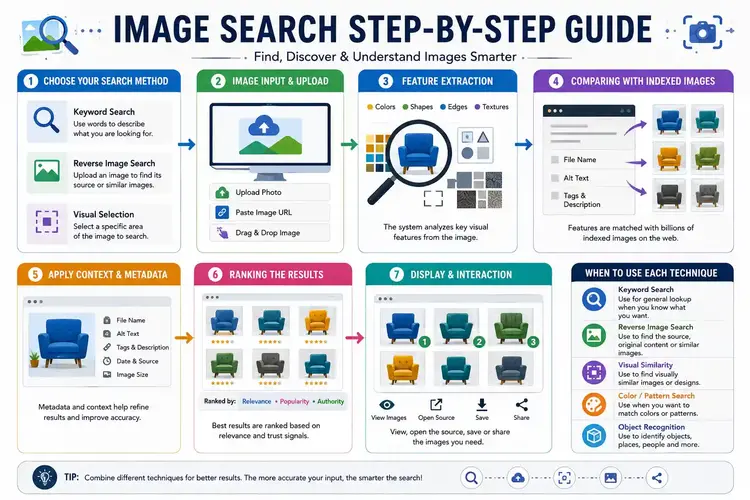
Step 1: Image Input
Everything starts with a prompt. You can upload a photo from your computer, drop an image URL into a search bar, or click on an already indexed image online. For instance, you might upload a snapshot of a vintage lamp you want to buy.
Step 2: Feature Extraction
Once you hit search, the computer vision model goes to work. It breaks your image down into core visual elements: colors, shapes, sharp edges, objects, and textures. These traits are translated into numbers—creating a unique digital fingerprint, known as a vector.
Step 3: Feature Matching
The system takes your image's unique vector and scans its massive database of billions of indexed images. The AI isn't just looking for an exact duplicate; it is searching for mathematical similarities to provide the closest visual matches.
Step 4: Context & Metadata Analysis
To ensure high accuracy, search engines don't rely on visuals alone. They look at the text surrounding similar images online. They analyze file names, Alt text, captions, and product descriptions to grasp the full context of what the image represents.
Step 5: Ranking & Display
Finally, the search engine ranks the matches. It factors in visual similarity, relevance to your probable intent, the freshness of the content, and the authority of the hosting website. The best results are then displayed on your screen, often accompanied by shopping links or related articles.
Why Image Search Matters for SEO
If you run a website, optimizing for image search is no longer optional. Visual platforms like Google Lens are changing how users discover content. Proper image search SEO ensures that high-quality visuals drive organic traffic to your pages. By optimizing alt text, using descriptive file names, and maintaining clear contextual relevance, you drastically boost your content's overall discoverability and search rankings.
5 Types of Image Search Techniques You Should Know
Different tasks require different tools. Here is a breakdown of the primary techniques available today:
- 1. Keyword-Based Image Search: The classic method. You type "sunset over the mountains," and the search engine finds images tagged with those words. It is perfect for broad concept searches.
- 2. Reverse Image Search: You upload a photo to find its source, detect plagiarism, or verify authenticity. It is an indispensable tool for journalists and photographers.
- 3. Visual Similarity Search: Instead of exact matches, this finds aesthetic alignment. If you upload a floral dress, it will show you dresses with similar patterns and colors. It's heavily used in eCommerce and interior design.
- 4. Color and Pattern-Based Search: Ideal for designers and marketers trying to maintain brand consistency. It filters search results based strictly on specific color palettes or gradients.
- 5. Object and Facial Recognition Search: Powered by advanced AI, this pinpoints specific elements within a photo, like a specific landmark, a celebrity's face, or a specific brand logo.
When to Use Each Technique
Knowing which method to use saves you time:
- Use Keyword Search when you are looking for general inspiration.
- Use Reverse Image Search to find the original creator of a photo.
- Use Visual Similarity Search when shopping for similar clothing or furniture.
- Use Object Recognition to identify a strange bug or a specific car model.
Top Tools for Image Search
Ready to put these techniques to the test? Here are some of the industry's top visual discovery tools:
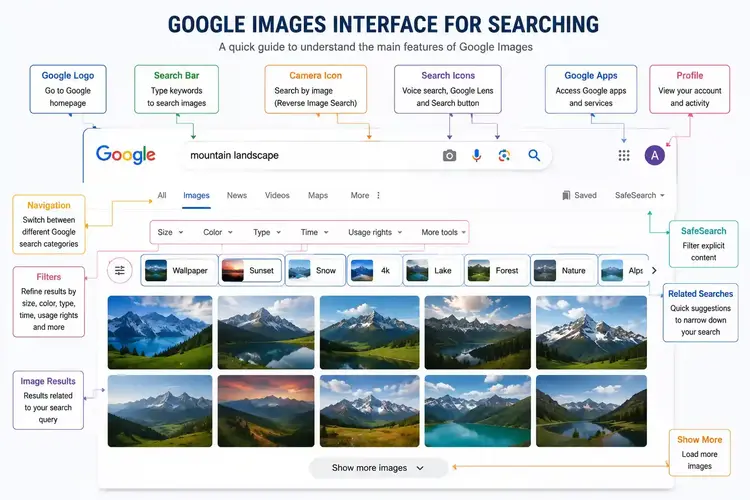
1. Google Images & Google Lens
The undisputed king of visual search. It handles keyword, reverse, and object recognition flawlessly. Its massive database makes it the go-to starting point for almost any visual query.

2. Lenso AI
A specialized tool that excels at facial recognition and tracking down image usage online. It is highly recommended for brand protection and identifying duplicate content across the web.
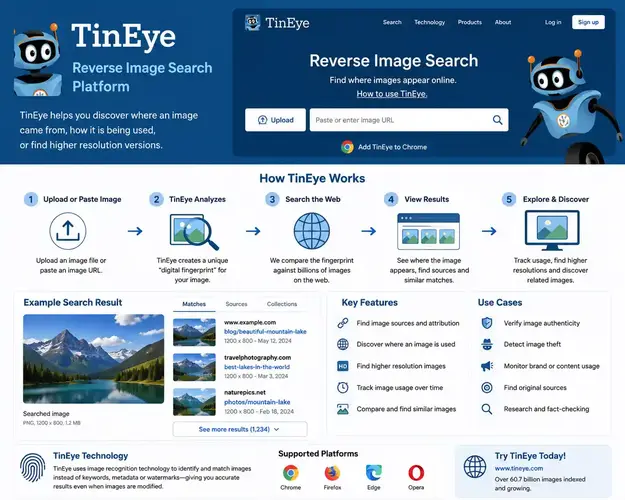
3. TinEye
A favorite among digital creators. TinEye doesn't just find exact matches; it finds versions of your image that have been cropped, edited, or resized. It's the ultimate tool for copyright protection.
Other Notable Tools
- Bing Visual Search: Great for online shopping and selecting specific elements within a broader image.
- Pinterest Lens: The best tool for lifestyle, fashion, and home decor inspiration.
- Yandex Images: Often uncovers deep-web matches and provides excellent facial recognition results that other tools miss.
Best Practices for Effective Image Searching
To get the most out of your searches, follow these simple rules:
- Quality Matters: Always upload high-resolution, uncropped images. Blurry visuals confuse the AI.
- Use Specific Keywords: Be descriptive. Don't just search "car"; search "vintage red convertible mustang."
- Cross-Reference: Don't rely on just one tool. Run your image through Google, TinEye, and Yandex for comprehensive results.
- Check Licensing: Just because you found an image doesn't mean it is free to use. Always verify copyright and usage rights.
The Future of Image Search
The future of visual discovery is incredibly exciting. As Machine Learning evolves, algorithms will begin to understand subtle context and human emotion within photographs. We will see deeper integration with Augmented Reality (AR)—allowing you to simply point your smart glasses at a restaurant to see its menu, or at a landmark to read its history. Personalization will also play a huge role, tailoring visual search results directly to your unique aesthetic preferences.
Frequently Asked Questions (FAQs)
1. What is the best tool for reverse image search?
Google Images and TinEye are widely considered the best tools for reverse image search due to their massive databases and accurate recognition capabilities.
2. How do image search techniques help SEO?
They improve visual discoverability, enhance overall content relevance, and can drive significant organic traffic through image search engines when alt text and metadata are properly optimized.
3. Can I search an image from my phone?
Yes, tools like Google Lens and the Pinterest app allow you to snap a photo or upload an image directly from your mobile device to conduct a search.
4. What is visual similarity search?
Visual similarity search looks for images that share aesthetic qualities like color palettes, patterns, and shapes, rather than looking for exact duplicates.
5. Is reverse image search safe for private photos?
Most reputable search engines do not save your uploaded images permanently. However, for highly sensitive photos, it's best to read the privacy policy of the specific tool you are using.
6. How does facial recognition work in image search?
Facial recognition uses AI to measure nodal points on a face (like the distance between eyes) to create a unique mathematical formula, which is then compared against a database to find matches.
7. Why are my image search results inaccurate?
Inaccurate results often stem from uploading low-resolution, heavily cropped, or blurred images that prevent the AI from extracting clear visual features.
8. Can I use image search to find copyright violations?
Absolutely. Photographers and brands frequently use tools like TinEye and Lenso AI to track where their original images are being used online without permission.